如何使用Git-Dumper从站点中导出一个Git库

如何使用Git-Dumper从站点中导出一个Git库

本文转自 Alpha_h4ck 并作补充

关于Git-Dumper

Git-Dumper是一款功能强大的代码导出工具,在该工具的帮助下,广大研究人员可以轻松从一个网站中导出目标Git库,并存储到本地设备中进行分析和研究。

工具运行机制

该工具首先会检测提供的目录列表是否可用,如果可用,该工具将会以递归的方式下载目标站点中所有的.git目录(该功能与使用wget效果相同)。

如果目录列表不可用,那么该工具将使用多种方法来尽可能地查找更多的文件,具体操作步骤如下:

1、获取所有的常见文件,例如.gitignore、.git/HEAD和.git/index等;

2、通过分析.git/HEAD、.git/logs/HEAD、.git/config和.git/packed-refs等文件来查找尽可能多的refs,例如refs/heads/master和refs/remotes/origin/HEAD;

3、通过分析.git/packed-refs、.git/index、.git/refs/*和.git/logs/*来寻找尽可能多的对象(sha1);

4、递归获取所有的对象,并分析每一个commit来查找父组件;

5、运行“git checkout .”命令来恢复当前工作树;

工具依赖

本项目基于Python 开发,因此广大研究人员首先需要在本地设备上安装并配置好Python环境。

工具下载

GitHub安装

广大研究人员可以使用下列命令将该项目源码克隆至本地:

1
git clone https://github.com/arthaud/git-dumper.git

pip安装

我们还可以使用pip来直接安装Git-Dumper:

1
pip install git-dumper

源码构建

下载好Git-Dumper之后,可以使用pip命令来安装工具依赖组件:

1
pip install -r requirements.txt

接下来,直接运行下列命令即可:

1
./git_dumper.py http://website.com/.git ~/website

工具帮助信息

1
2
3
4
5
6
7
8
9
10
11
12
13
14
15
16
17
18
19
20
21
22
23
24
25
26
27
28
29
30
31
32
33
usage: git-dumper [options] URL DIR

Dump a git repository from a website.

positional arguments:

URL url

DIR output directory

optional arguments:

-h, --help show this help message and exit

--proxy PROXY use the specified proxy

-j JOBS, --jobs JOBS number of simultaneous requests

-r RETRY, --retry RETRY

number of request attempts before giving up

-t TIMEOUT, --timeout TIMEOUT

maximum time in seconds before giving up

-u USER_AGENT, --user-agent USER_AGENT

user-agent to use for requests

-H HEADER, --header HEADER

additional http headers, e.g `NAME=VALUE`

命令解释

-h, –help:显示工具帮助信息和退出;

–proxy PROXY:设置使用指定的代理;

-j JOBS, –jobs JOBS:设置同时发送的请求数量;

-r RETRY, –retry RETRY:设置请求发送尝试的最大次数;

-t TIMEOUT, –timeout TIMEOUT:设置最大超时时间,单位为秒;

-u USER_AGENT, –user-agent USER_AGENT:设置用于发送请求的用户代理;

-H HEADER, –header HEADER:设置需要添加的额外HTTP Header;

工具使用样例

下列命令可以从目标站点直接导出Git库:

1
git-dumper http://website.com/.git ~/website

项目地址

Git-Dumper:GitHub传送门

gitleaks 扫描git存储库文件和目录中的敏感信息

gitleaks 扫描git存储库文件和目录中的敏感信息

本文转自 雨苁 并作补充

Gitleaks简介

Gitleaks 是一款 SAST 工具,用于检测防止git repos 中的密码、API 密钥和令牌等硬编码机密。Gitleaks 是一款易于使用的一体化解决方案,用于检测代码中过去或现在的机密。

Gitleaks 是一款开源秘密扫描器,用于扫描 git 存储库、文件和目录。Gitleaks 拥有超过 1600 万次 docker 下载、1.7 万个 GitHub 星标、900 万次 GitHub 下载、每周数千次克隆和超过 70 万次自制软件安装,是安全专家、企业和开发人员最信赖的开源秘密扫描器。Gitleaks 由 Zach Rice维护。

image

使用示例

1
2
3
4
5
6
7
8
9
10
11
12
13
14
15
16
17
18
19
20
➜  ~/code(master) gitleaks git -v


│╲
│ ○
○ ░
░ gitleaks


Finding: "export BUNDLE_ENTERPRISE__CONTRIBSYS__COM=cafebabe:deadbeef",
Secret: cafebabe:deadbeef
RuleID: sidekiq-secret
Entropy: 2.609850
File: cmd/generate/config/rules/sidekiq.go
Line: 23
Commit: cd5226711335c68be1e720b318b7bc3135a30eb2
Author: John
Email: john@users.noreply.github.com
Date: 2022-08-03T12:31:40Z
Fingerprint: cd5226711335c68be1e720b318b7bc3135a30eb2:cmd/generate/config/rules/sidekiq.go:sidekiq-secret:23

入门

Gitleaks 可以使用 Homebrew、Docker 或 Go 安装。Gitleaks 还提供了适用于许多流行平台和操作系统类型的二进制版本,发布页面上提供。此外,Gitleaks 可以直接在您的存储库中作为预提交钩子实现,也可以使用Gitleaks-Action作为 GitHub 操作实现。

安装

1
2
3
4
5
6
7
8
9
10
11
12
13
14
15
# MacOS
brew install gitleaks

# Docker (DockerHub)
docker pull zricethezav/gitleaks:latest
docker run -v ${path_to_host_folder_to_scan}:/path zricethezav/gitleaks:latest [命令] [选项] [源路径]

# Docker (ghcr.io)
docker pull ghcr.io/gitleaks/gitleaks:latest
docker run -v ${path_to_host_folder_to_scan}:/path ghcr.io/gitleaks/gitleaks:latest [命令] [选项] [源路径]

# 从源码安装 (确保已安装 go)
git clone https://github.com/gitleaks/gitleaks.git
cd gitleaks
make build

GitHub action

查看官方Gitleaks GitHub Action

1
2
3
4
5
6
7
8
9
10
11
12
13
14
name: gitleaks
on: [pull_request, push, workflow_dispatch]
jobs:
scan:
name: gitleaks
runs-on: ubuntu-latest
steps:
- uses: actions/checkout@v3
with:
fetch-depth: 0
- uses: gitleaks/gitleaks-action@v2
env:
GITHUB_TOKEN: ${{ secrets.GITHUB_TOKEN }}
GITLEAKS_LICENSE: ${{ secrets.GITLEAKS_LICENSE}} # Only required for Organizations, not personal accounts.

Pre-Commit

  1. 从https://pre-commit.com/#install安装 precommit
  2. .pre-commit-config.yaml在存储库的根目录创建一个包含以下内容的文件:repos: - repo: https://github.com/gitleaks/gitleaks rev: v8.19.0 hooks: - id: gitleaks 用于本机执行 GitLeaks或使用gitleaks-docker预提交 ID通过官方 Docker 镜像执行 GitLeaks
  3. 通过执行自动更新配置到最新的版本pre-commit autoupdate
  4. 安装pre-commit install
  5. 现在您已经一切就绪!
1
2
➜ git commit -m "this commit contains a secret"
Detect hardcoded secrets.................................................Failed

注意:要禁用 gitleaks 预提交钩子,你可以SKIP=gitleaks在提交命令前面添加,这样它就会跳过运行 gitleaks

1
2
➜ SKIP=gitleaks git commit -m "skip gitleaks check"
Detect hardcoded secrets................................................Skipped

用法

1
2
3
4
5
6
7
8
9
10
11
12
13
14
15
16
17
18
19
20
21
22
23
24
25
26
27
28
29
30
31
32
33
34
35
36
用法:
gitleaks [命令]

可用命令:
completion 为指定的 shell 生成自动补全脚本
dir 扫描目录或文件中的敏感信息
git 扫描 Git 仓库中的敏感信息
help 查看任意命令的帮助
stdin 从标准输入中检测敏感信息
version 显示 gitleaks 版本

选项:
-b, --baseline-path string 忽略某些问题的基准文件路径
-c, --config string 配置文件路径
优先级顺序:
1. --config/-c
2. 环境变量 GITLEAKS_CONFIG
3. (目标路径)/.gitleaks.toml
如果以上三者都未设置,gitleaks 将使用默认配置
--enable-rule strings 仅启用指定 ID 的规则
--exit-code int 检测到泄露信息时的退出代码(默认值为 1)
-i, --gitleaks-ignore-path string .gitleaksignore 文件或包含此文件的文件夹路径(默认值为 ".")
-h, --help gitleaks 帮助
--ignore-gitleaks-allow 忽略 gitleaks:allow 注释
-l, --log-level string 日志级别(trace, debug, info, warn, error, fatal)(默认 "info")
--max-decode-depth int 允许递归解码的最大深度(默认 "0",不进行解码)
--max-target-megabytes int 跳过大于该大小的文件
--no-banner 禁止显示横幅
--no-color 禁用彩色输出
--redact uint[=100] 在日志和标准输出中隐藏敏感信息。仅隐藏部分敏感信息可以设置百分比,例如 --redact=20(默认隐藏 100%)
-f, --report-format string 输出格式(json, csv, junit, sarif)(默认 "json")
-r, --report-path string 报告文件路径
-v, --verbose 显示扫描的详细输出
--version 显示 gitleaks 的版本信息

使用 "gitleaks [command] --help" 获取有关某个命令的更多信息。

命令

⚠️v8.19.0 引入了一项更改,即弃用了detectprotect。这些命令仍然可用,但隐藏在--help菜单中。查看此要点以轻松进行命令翻译。如果您发现 v8.19.0 破坏了现有命令 ( detect/ protect),请打开问题。

扫描模式有三种:gitdirstdin

Git

git命令允许您扫描本地 git 存储库。在底层,gitleaks 使用命令来扫描补丁。您可以使用选项git log -p配置的行为。例如,如果您想对一系列提交运行 gitleaks,则可以使用以下命令:。有关更多信息,请参阅git log文档。如果没有将目标指定为位置参数,则 gitleaks 将尝试将当前工作目录扫描为 git 存储库。git log -p``log-opts``gitleaks git -v --log-opts="--all commitA..commitB" path_to_repo

目录

dir(别名包括files, )命令directory允许您扫描目录和文件。例如:gitleaks dir -v path_to_directory_or_file。如果没有将目标指定为位置参数,则 gitleaks 将扫描当前工作目录。

标准输入

你也可以用以下命令将数据传输到 gitleaks stdin。例如:cat some_file | gitleaks -v stdin

创建基线

扫描大型存储库或具有较长历史的存储库时,使用基线会很方便。使用基线时,gitleaks 将忽略基线中存在的任何旧发现。基线可以是任何 gitleaks 报告。要创建 gitleaks 报告,请使用参数运行 gitleaks --report-path

1
gitleaks git --report-path gitleaks-report.json # This will save the report in a file called gitleaks-report.json

一旦创建基线,就可以在再次运行检测命令时应用它:

1
gitleaks git --baseline-path gitleaks-report.json --report-path findings.json

使用 –baseline-path 参数运行detect命令后,报告输出(findings.json)将只包含新问题。

预提交钩子

pre-commit.py您可以将示例脚本复制到目录中,以将 Gitleaks 作为预提交钩子运行.git/hooks/

配置

Gitleaks 提供了一种配置格式,您可以按照该格式编写自己的秘密检测规则:

1
# Title for the gitleaks configuration file.title = "Gitleaks title"# Extend the base (this) configuration. When you extend a configuration# the base rules take precedence over the extended rules. I.e., if there are# duplicate rules in both the base configuration and the extended configuration# the base rules will override the extended rules.# Another thing to know with extending configurations is you can chain together# multiple configuration files to a depth of 2. Allowlist arrays are appended# and can contain duplicates.# useDefault and path can NOT be used at the same time. Choose one.[extend]# useDefault will extend the base configuration with the default gitleaks config:# https://github.com/gitleaks/gitleaks/blob/master/config/gitleaks.tomluseDefault = true# or you can supply a path to a configuration. Path is relative to where gitleaks# was invoked, not the location of the base config.path = "common_config.toml"# An array of tables that contain information that define instructions# on how to detect secrets[[rules]]# Unique identifier for this ruleid = "awesome-rule-1"# Short human readable description of the rule.description = "awesome rule 1"# Golang regular expression used to detect secrets. Note Golang's regex engine# does not support lookaheads.regex = '''one-go-style-regex-for-this-rule'''# Int used to extract secret from regex match and used as the group that will have# its entropy checked if `entropy` is set.secretGroup = 3# Float representing the minimum shannon entropy a regex group must have to be considered a secret.entropy = 3.5# Golang regular expression used to match paths. This can be used as a standalone rule or it can be used# in conjunction with a valid `regex` entry.path = '''a-file-path-regex'''# Keywords are used for pre-regex check filtering. Rules that contain# keywords will perform a quick string compare check to make sure the# keyword(s) are in the content being scanned. Ideally these values should# either be part of the identiifer or unique strings specific to the rule's regex# (introduced in v8.6.0)keywords = [  "auth",  "password",  "token",]# Array of strings used for metadata and reporting purposes.tags = ["tag","another tag"]    # ⚠️ In v8.21.0 `[rules.allowlist]` was replaced with `[[rules.allowlists]]`.    # This change was backwards-compatible: instances of `[rules.allowlist]` still  work.      #    # You can define multiple allowlists for a rule to reduce false positives.    # A finding will be ignored if _ANY_ `[[rules.allowlists]]` matches.    [[rules.allowlists]]    description = "ignore commit A"    # When multiple criteria are defined the default condition is "OR".    # e.g., this can match on |commits| OR |paths| OR |stopwords|.    condition = "OR"    commits = [ "commit-A", "commit-B"]    paths = [      '''go\.mod''',      '''go\.sum'''    ]    # note: stopwords targets the extracted secret, not the entire regex match    # like 'regexes' does. (stopwords introduced in 8.8.0)    stopwords = [      '''client''',      '''endpoint''',    ]    [[rules.allowlists]]    # The "AND" condition can be used to make sure all criteria match.    # e.g., this matches if |regexes| AND |paths| are satisfied.    condition = "AND"    # note: |regexes| defaults to check the _Secret_ in the finding.    # Acceptable values for |regexTarget| are "secret" (default), "match", and "line".    regexTarget = "match"    regexes = [ '''(?i)parseur[il]''' ]    paths = [ '''package-lock\.json''' ]# You can extend a particular rule from the default config. e.g., gitlab-pat# if you have defined a custom token prefix on your GitLab instance[[rules]]id = "gitlab-pat"# all the other attributes from the default rule are inherited    [[rules.allowlists]]    regexTarget = "line"    regexes = [ '''MY-glpat-''' ]# This is a global allowlist which has a higher order of precedence than rule-specific allowlists.# If a commit listed in the `commits` field below is encountered then that commit will be skipped and no# secrets will be detected for said commit. The same logic applies for regexes and paths.[allowlist]description = "global allow list"commits = [ "commit-A", "commit-B", "commit-C"]paths = [  '''gitleaks\.toml''',  '''(.*?)(jpg|gif|doc)''']# note: (global) regexTarget defaults to check the _Secret_ in the finding.# if regexTarget is not specified then _Secret_ will be used.# Acceptable values for regexTarget are "match" and "line"regexTarget = "match"regexes = [  '''219-09-9999''',  '''078-05-1120''',  '''(9[0-9]{2}|666)-\d{2}-\d{4}''',]# note: stopwords targets the extracted secret, not the entire regex match# like 'regexes' does. (stopwords introduced in 8.8.0)stopwords = [  '''client''',  '''endpoint''',]

请参阅默认gitleaks 配置以获取示例,或者如果您希望为默认配置做出贡献,请遵循贡献指南。此外,您还可以查看这篇涵盖高级配置设置的gitleaks 博客文章。

附加配置

gitleaks:允许

如果你故意提交 gitleaks 会捕获的测试机密,你可以gitleaks:allow在该行中添加注释,指示 gitleaks 忽略该机密。例如:

1
2
class CustomClass:
discord_client_secret = '8dyfuiRyq=vVc3RRr_edRk-fK__JItpZ' #gitleaks:allow

.gitleaksignore

.gitleaksignore您可以通过在存储库根目录下创建一个文件来忽略特定发现。在版本 v8.10.0 中,GitleaksFingerprint为 Gitleaks 报告添加了一个值。每个泄漏或发现都有一个指纹,可以唯一地标识一个秘密。将此指纹添加到.gitleaksignore文件中以忽略该特定秘密。有关示例,请参阅 Gitleaks 的.gitleaksignore。注意:此功能是实验性的,将来可能会发生变化。

解码

有时秘密的编码方式使得仅使用正则表达式很难找到它们。现在您可以告诉 gitleaks 自动查找和解码编码文本。该标志--max-decode-depth启用此功能(默认值“0”表示默认情况下禁用该功能)。

由于解码的文本也可以包含编码的文本,因此支持递归解码。该标志--max-decode-depth设置递归限制。当没有新的编码文本段需要解码时,递归将停止,因此设置非常高的最大深度并不意味着它会进行那么多遍。它只会进行解码文本所需的次数。总体而言,解码只会稍微增加扫描时间。

编码文本的发现与正常发现有以下不同:

  • 该位置指向编码文本的边界
    • 如果规则在编码文本之外匹配,则边界也会调整以包括该文本
  • 匹配和秘密包含解码的值
  • 添加了两个标签decoded:<encoding>decode-depth:<depth>

目前支持的编码:

  • base64(标准和 base64url)

项目地址

GitHub:
https://github.com/gitleaks/gitleaks

如何通过 Github 找到一个人?

如何通过 Github 找到一个人?

本文转自白宦成 并作补充

很多时候,我们都需要找到一个人的联系方式。但是,并不是每一次我们都可以很好的拿到他的联系方式,这个时候,我们就需要借助一些奇技淫巧来找到一个人的联系方式。

Requirements

Github 账号

你要找的人的 GitHub 账号(需要其账号下有仓库)

原理

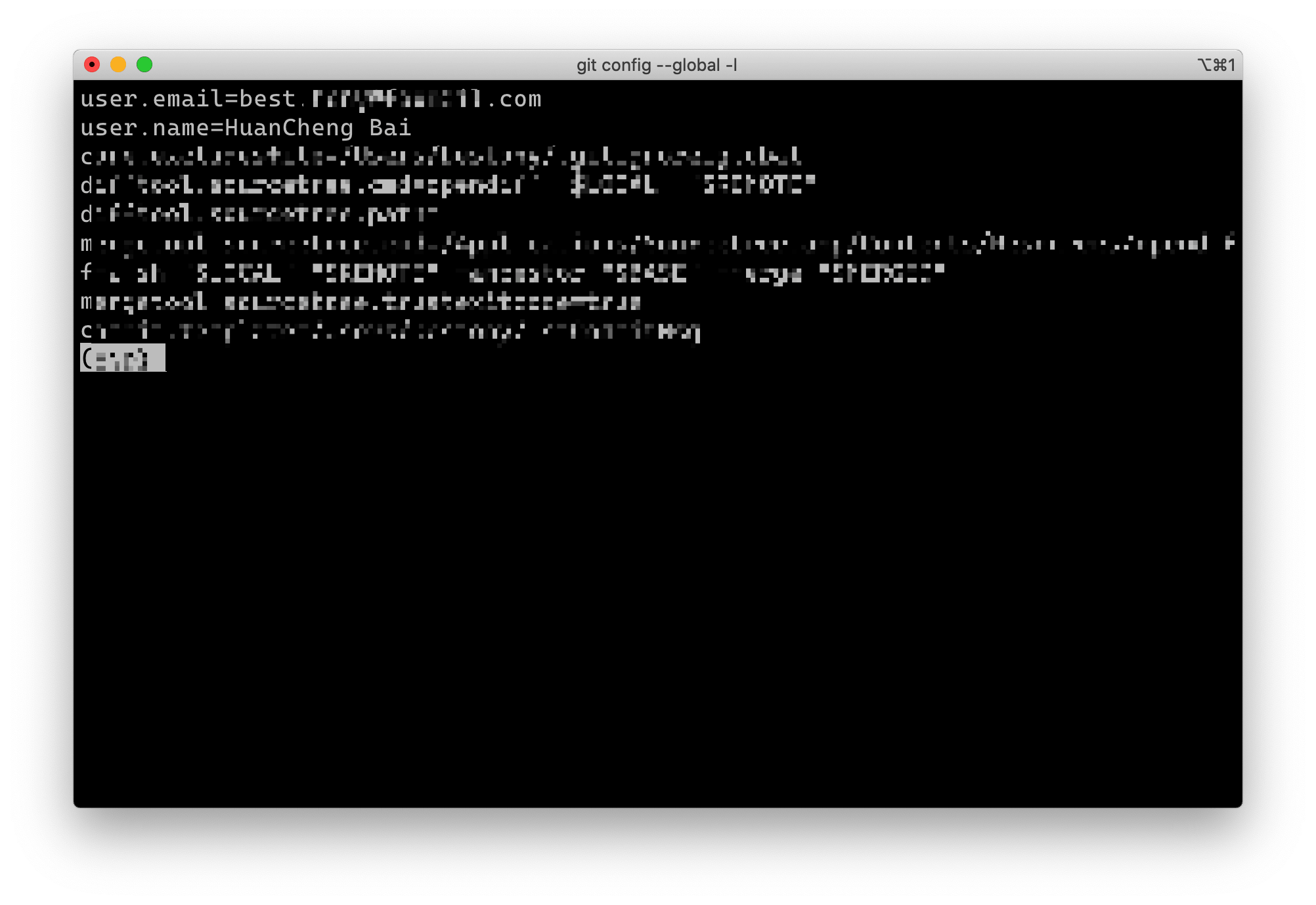
在我们使用 Git 进行版本控制时,一开始,我们会被要求设置一个 Git 的用户名和邮箱,就像下面这样。

image

后续,我们的每一个 Commit 都会基于我们填写的用户名和邮箱来进行存储。我们只需要查询一个人在 Github 的提交记录,就可以找到他填写在 Git 中的邮箱和名字,从而方便我们更进一步找到这个人。

实践

想要通过 Git 找到一个人的邮箱,最简单的方法就是使用 Github 提供的 GraphQL 来进行查询,简单方便。

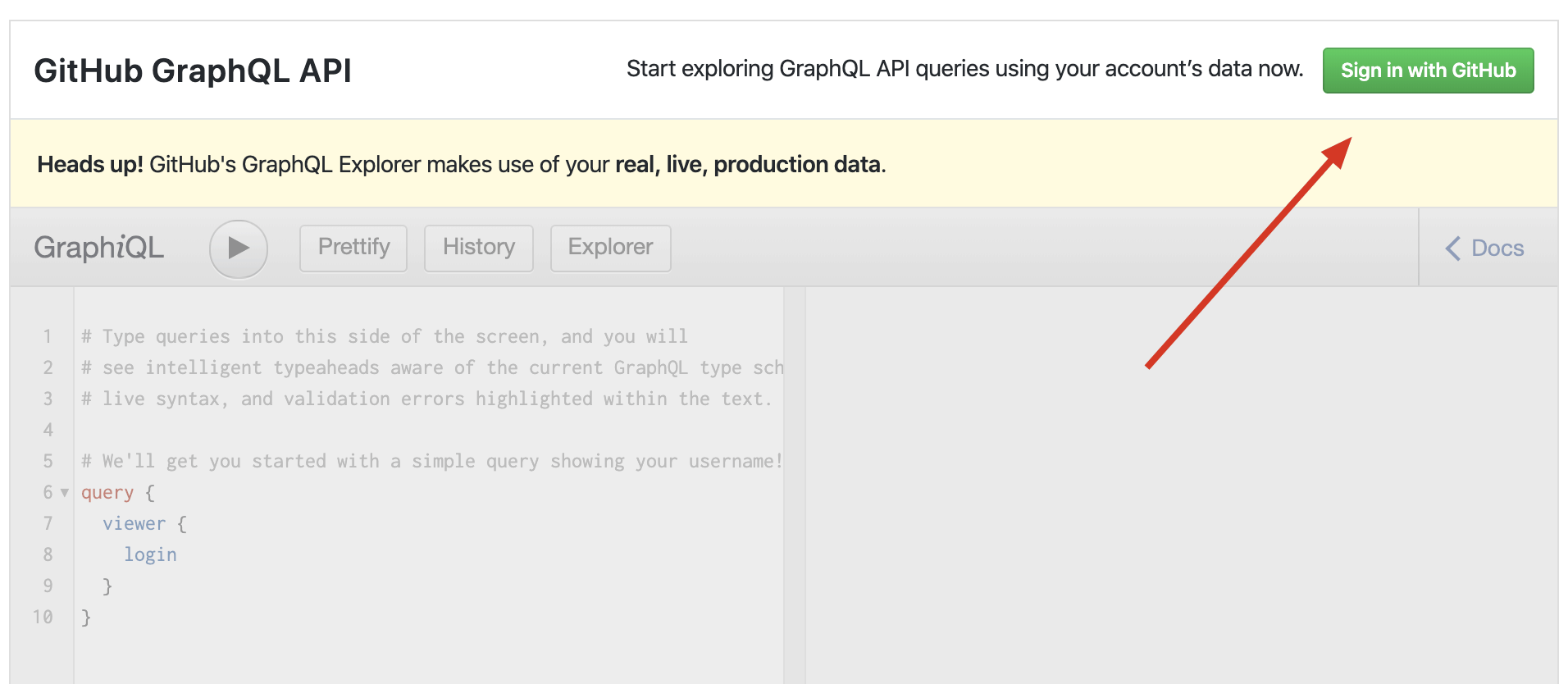
访问Github 的 GraphQL API Explorer,点击右侧的 Sign in ,使用你的 Github 账号登陆,这样就可以调用 Github 的 API 了。

image

登陆后,你下方的 GraphQL 输入框就可以输入内容了。在其中输入如下代码

1
2
3
4
5
6
7
8
9
10
11
12
13
14
15
16
17
18
19
20
21
{
repository(name: "grank", owner: "lctt") {
ref(qualifiedName: "master") {
target {
... on Commit {
id
history(first: 5) {
edges {
node {
author {
name
email
}
}
}
}
}
}
}
}
}

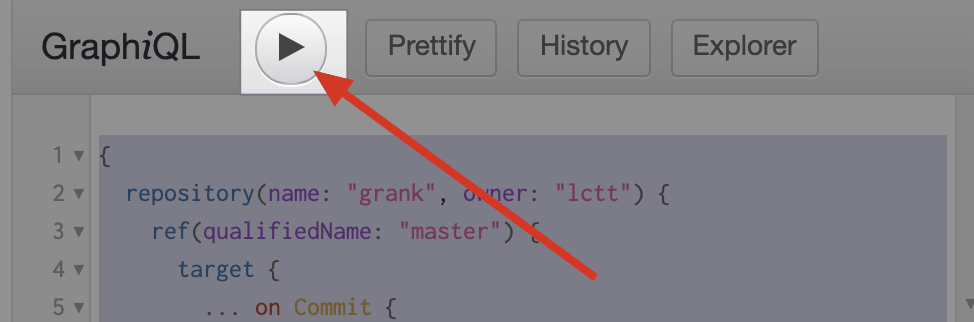
并将 name 替换为你要查询的人的 repo 名,owner 改为你需要查询的人的名字,然后点击执行按钮。

image

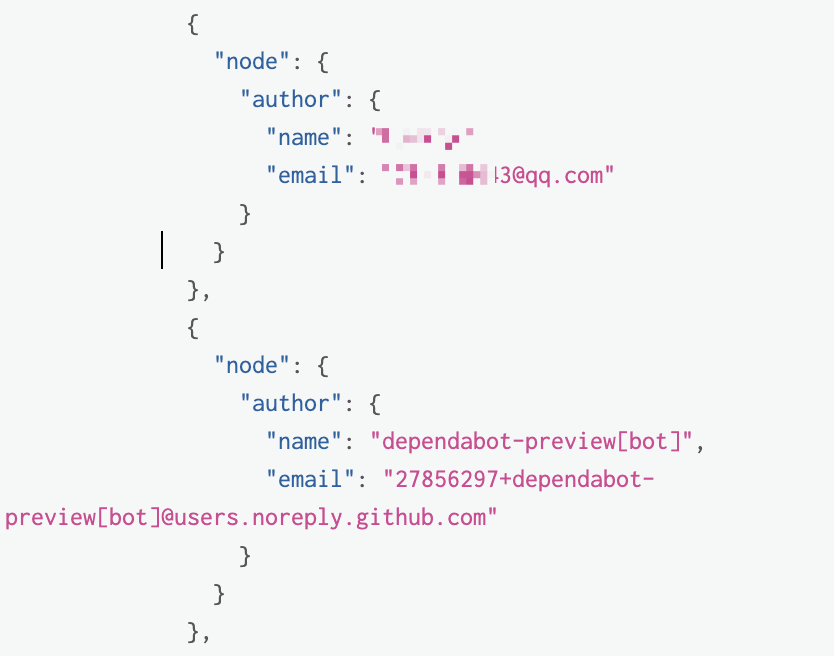
右侧会出现你的执行结果,你会发现,其中出现我们想要的“邮箱”地址。

image

你会发现,这里其实有两种类型的邮箱,一种是我们常见的,自己用的各种免费邮箱,比如 @qq.com、@gmail.com、@foxmail.com 之类的;另一种是形如 27856297+dependabot-preview[bot]@users.noreply.github.com 这样的邮箱。

这两种邮箱的区别是,前者是我们自己通过 git 设置的邮箱,而后者则是我们通过 Github 网页、 API 操作产生的 commit 。你在查询的时候,要记得去找第一类邮箱来作为参考。

当然,不排除有开发者在看了本篇文章后,去用 private 邮箱修改自己本地的 Git ,那就没办法了。

找到这个邮箱以后怎么办呢?

直接发邮件联系
如果是 QQ 邮箱、 Foxmail ,可以试着直接用邮箱,或者邮箱里的 QQ 号加好友。
通过 Google 搜索这个邮箱,查找其他的关联信息。